 DocsTopicsSearch docsAPI referenceDocsTopicsSearch docsAPI reference
Framework
A tenant can pilot a feature while other tenants keep the existing behavior. A super administrator defines the toggle and its default, then sets a narrower override. Check the resolved value in the target scope before assuming a rollout succeeded.
[!IMPORTANT] Required Role: Super Admin only.
The feature_toggles module allows administrators to enable or disable features, modules, or specific functionality at runtime without code deployment. It also supports runtime configuration, allowing you to change application behavior (strings, numbers, JSON config) dynamically. This provides operational flexibility for controlled rollouts, client-specific customizations, and emergency kill switches.
The feature toggles system is built around two primary entities that control feature availability.
Defines the global state and behavior of a feature flag.
id (uuid): Unique identifier for the toggle.identifier (string): The unique key used in code to check the feature (e.g., checkout.new_flow).name (string): Human-readable name.description (string?): Optional description of the feature.category (string?): Optional grouping category.type (enum): The data type of the toggle (boolean, string, number, json).defaultValue (jsonb): The global default value used if no specific override matches.Allows granular control over a feature toggle for specific contexts.
id (uuid): Unique identifier for the override.toggle (relation): Reference to the parent FeatureToggle.tenantId (uuid): The tenant this override applies to.value (jsonb): The specific value for this context.If no
FeatureToggleOverrideentity exists for a specific tenant, the system inherits the value from theFeatureToggle.defaultValue.
To ensure high performance and minimal latency, feature flag resolutions are heavily cached.
feature_toggles:isEnabled:{identifier}:{tenantId}.FeatureToggle definition from the database.FeatureToggleOverride matching the requested tenant.Cache entries are tagged to allow for precise invalidation when toggles or overrides are modified.
feature_toggles:toggle:{identifier}feature_toggles:tenant:{tenantId}All modifications to feature toggles and overrides are audited to ensure accountability and traceability.
read:list) to track who is verifying feature configurations.The system supports strict typing for different feature toggle kinds. Choose the appropriate method for your data type.
Use for simple on/off switches.
React Component (FeatureGuard)
Wrapper for conditional rendering. Designed strictly for boolean toggles.
import { FeatureGuard } from '@open-mercato/core/modules/feature_toggles/components/FeatureGuard';

<FeatureGuard
  id="checkout_flow_v2"
  fallback={<div className="alert">Feature disabled</div>}
>
  <CheckoutComponent />
</FeatureGuard>
Frontend Hook
const { enabled, isLoading } = useFeatureFlagBoolean({ id: 'checkout_flow_v2' });
Unresolved checks and defaultValue
A check can fail to resolve: the toggle may not be defined for the tenant, its
type may not match, or the request may fail. Every frontend hook accepts a
defaultValue that is used in those cases and while the request is in flight.
useFeatureFlagBoolean defaults to false, which is right for toggles that
switch a feature on – an unresolved toggle leaves it off. It is wrong for
toggles that hide existing UI, because an unrelated failure would make that
UI disappear. Those toggles should fail open:
// Channels stay visible unless the toggle explicitly resolves to false.
const { enabled } = useFeatureFlagBoolean({ id: 'sales_channels_enabled', defaultValue: true });
FeatureGuard takes the same option. Note that defaultValue and fallback
are different things: defaultValue is the toggle value assumed when the check
cannot be resolved, while fallback is the node rendered once the feature is
known to be disabled.
<FeatureGuard id="sales_channels_enabled" defaultValue>
  <ChannelsSection />
</FeatureGuard>
The string, number, and JSON hooks accept defaultValue too; theirs defaults to
null.
Backend Service
const result = await service.getBoolConfig('checkout_flow_v2', tenantId);
if (result.ok && result.value) {
  // Feature is enabled
}
Use for dynamic text, labels, or string keys.
Frontend Hook
const { value: title } = useFeatureFlagString({ id: 'home_page_title' });
Backend Service
const result = await service.getStringConfig('home_page_title', tenantId);
Use for numeric limits, timeouts, or counts.
Frontend Hook
const { value: limit } = useFeatureFlagNumber({ id: 'max_items_per_order' });
Backend Service
const result = await service.getNumberConfig('max_items_per_order', tenantId);
Use for complex configuration objects.
Frontend Hook
// Pass a generic type for type safety
const { value: config } = useFeatureFlagJson<PaymentConfig>({ id: 'payment_provider_config' });
Backend Service
const result = await service.getJsonConfig<PaymentConfig>('payment_provider_config', tenantId);
All check operations return a standardized Result<T> structure (backend) or expose error states (frontend).
type Result<T> =
  | { ok: true; value: T; resolution: ResolutionMetadata }
  | { ok: false; error: ToggleError; resolution: ResolutionMetadata }
TYPE_MISMATCH: The toggle exists but is not of the requested type (e.g., requested String but found Boolean).
MISSING_TOGGLE: The identifier does not exist in the system.
INVALID_VALUE: The stored value could not be parsed.
When interacting with the API directly:
200 OK: Successful check.400 Bad Request: Type mismatch or missing parameters.401 Unauthorized: Missing authentication.404 Not Found: Toggle identifier does not exist or tenant context is missing.Manage your feature toggles through the Admin UI.
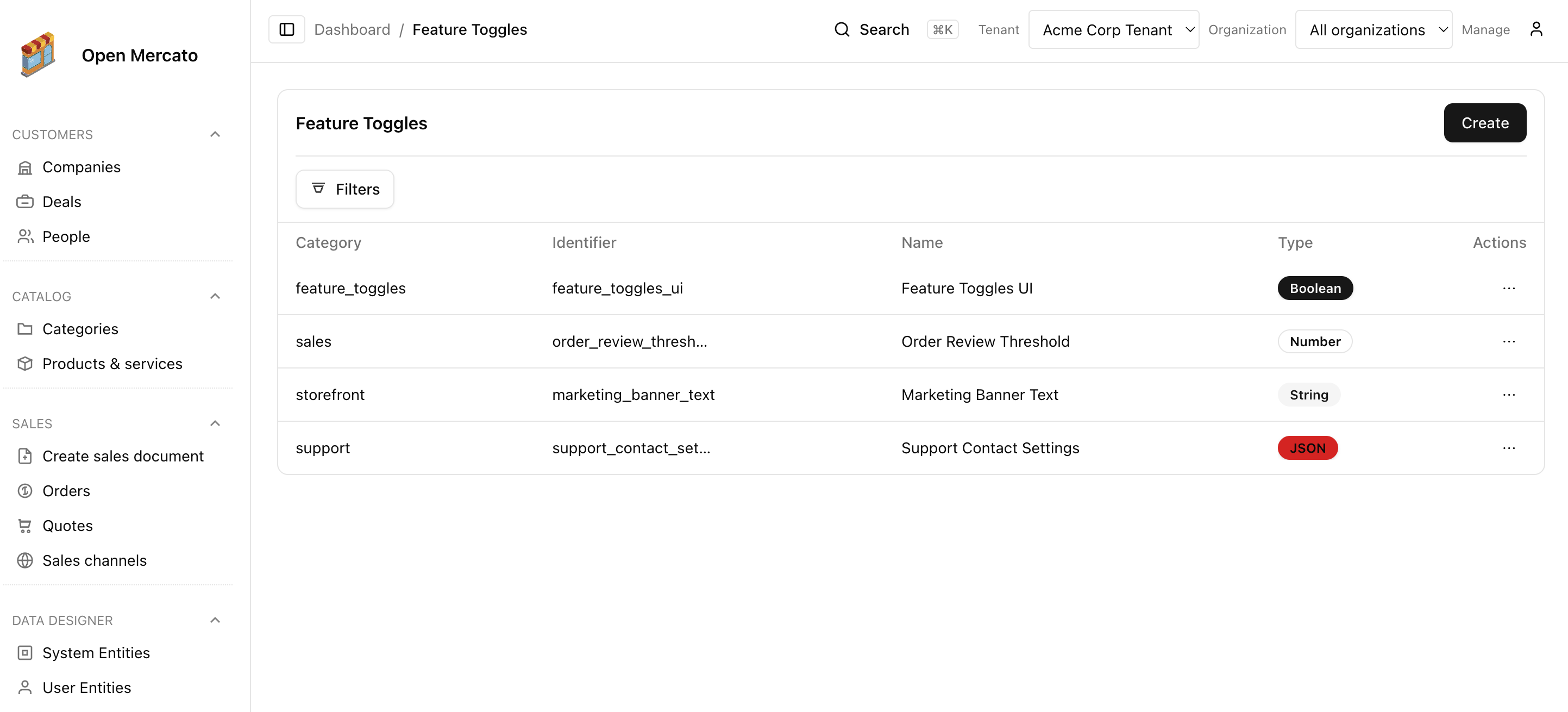
View and manage all global feature flags.
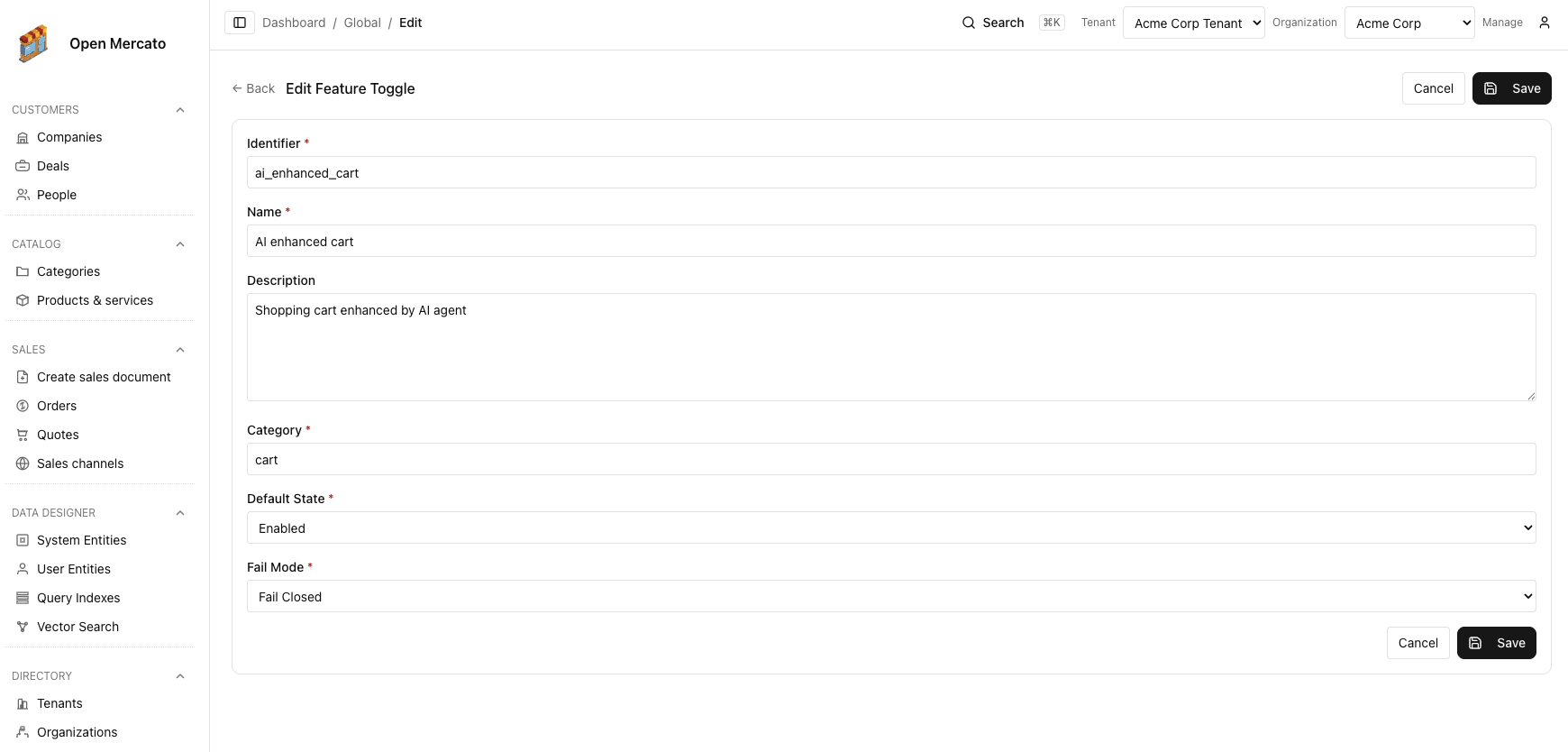
Update the status and details of a feature toggle.
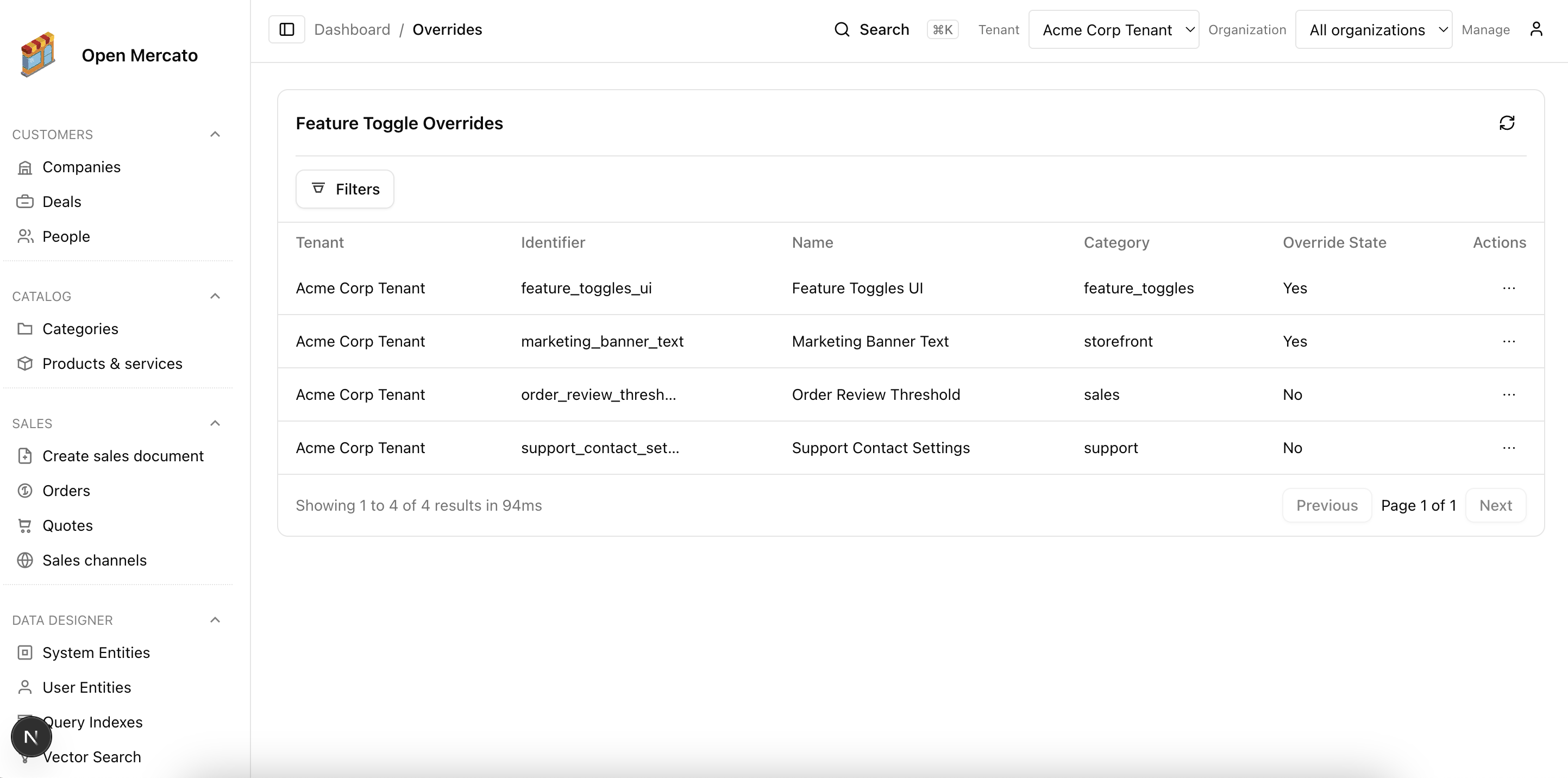
Configure specific overrides for feature toggles.
Set a conservative default and a different value for one test tenant. Read the same setting inside that tenant and another tenant with no override. Verify both before widening the rollout.
Previous: UMES Phases (A-N) · Next: Dependency injection container