 DocsTopicsSearch docsAPI referenceDocsTopicsSearch docsAPI reference
Framework
When an approval is waiting for a person, the request that started it has long since returned. The workflow definition describes the allowable steps. The instance, step state and context record where one approval stands and what can resume it.
The workflow engine manages long-running business processes through a state machine model. It coordinates steps, transitions, activities, and human interactions while maintaining complete audit trails through event sourcing.
Key Design Principles:
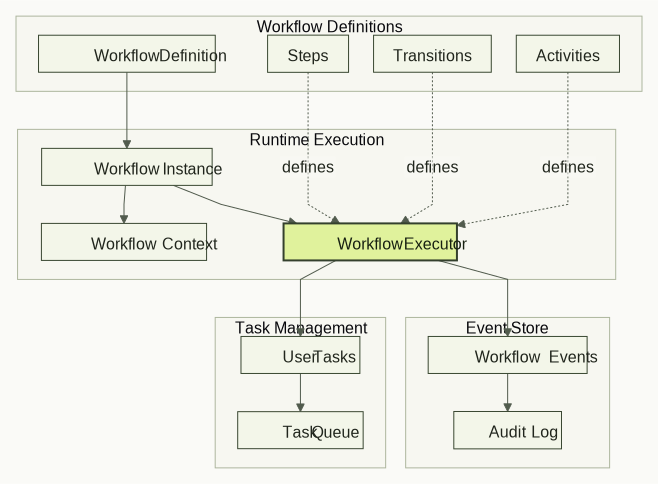
graph TB
    subgraph "Workflow Definitions"
        DEF[Workflow Definition]
        STEP[Steps]
        TRANS[Transitions]
        ACT[Activities]
    end

    subgraph "Runtime Execution"
        INST[Workflow Instance]
        CTX[Workflow Context]
        EXEC[Workflow Executor]
    end

    subgraph "Event Store"
        EVENTS[Workflow Events]
        LOG[Audit Log]
    end

    subgraph "Task Management"
        TASK[User Tasks]
        QUEUE[Task Queue]
    end

    DEF --> INST
    INST --> CTX
    INST --> EXEC
    EXEC --> EVENTS
    EVENTS --> LOG
    EXEC --> TASK
    TASK --> QUEUE
    STEP -.defines.-> EXEC
    TRANS -.defines.-> EXEC
    ACT -.defines.-> EXEC

    classDef focus fill:#e0f29c,stroke:#34402d,color:#172011,stroke-width:2px
    class EXEC focus
A workflow definition is a template that describes the process structure:
Multiple versions of the same workflowId coexist, and a WorkflowInstance pins the definition record it started on – the engine re-reads that record on every advance.
That makes a definition record editable but not freely so. PUT /api/workflows/definitions/[id] refuses a structural change while instances are still executing against it, and answers 409 with code: WORKFLOW_STRUCTURAL_EDIT_REQUIRES_NEW_VERSION plus the count of active instances, naming the publish endpoint as the remedy. The decision lives in the pure lib/definition-edit-safety.ts:
kind.RUNNING, PAUSED, WAITING_FOR_ACTIVITIES, FORKED, COMPENSATING. Terminal instances never re-read the definition, so they do not constrain edits.The per-user draft route (api/definitions/[id]/draft) is never subject to the guard – work in progress must stay saveable.
WORKFLOW_ENGINE_VERSION (lib/engine-version.ts) is the forward-compatibility guard for step types added after the first release. A definition may carry metadata.minEngineVersion; an engine whose own version is lower refuses to instantiate it rather than silently mis-executing a step type it does not know.
| Version | Adds |
|---|---|
| 1 | Baseline – every step type up to and including WAIT_FOR_TIMER |
| 2 | IF_ELSE, SWITCH |
| 3 | WAIT_FOR_CONDITION |
resolveRequiredEngineVersion(definition) derives the requirement from the step types a definition actually uses, and the editor stamps it on save. When you teach the engine a new definition capability, bump the constant and add the step type to STEP_TYPE_MIN_ENGINE_VERSIONS.
IF_ELSE and SWITCH are transition sugar, not new execution semantics: their step handler completes immediately, exactly like an activity-less AUTOMATED step, and all routing stays in findValidTransitions. WAIT_FOR_CONDITION is a genuine wait state – lib/condition-handler.ts evaluates the predicate on every context write (wakeConditionWaiters) and re-checks it from a queued poll job with an absolute deadline as the durability backstop.
A workflow instance is a running execution of a definition:
The context is a JSON object that stores all workflow data:
{
  "orderId": "order-123",
  "customerId": "cust-456",
  "amount": 150.00,
  "decision": "approve",
  "transactionId": "txn_abc123",
  "activities": {
    "send-email": { "output": { "messageId": "msg-123" } },
    "call-payment-api": { "output": { "transactionId": "txn_abc123" } }
  }
}
Context Sources:
activities.<activityId>.output)The executor is the state machine engine that:
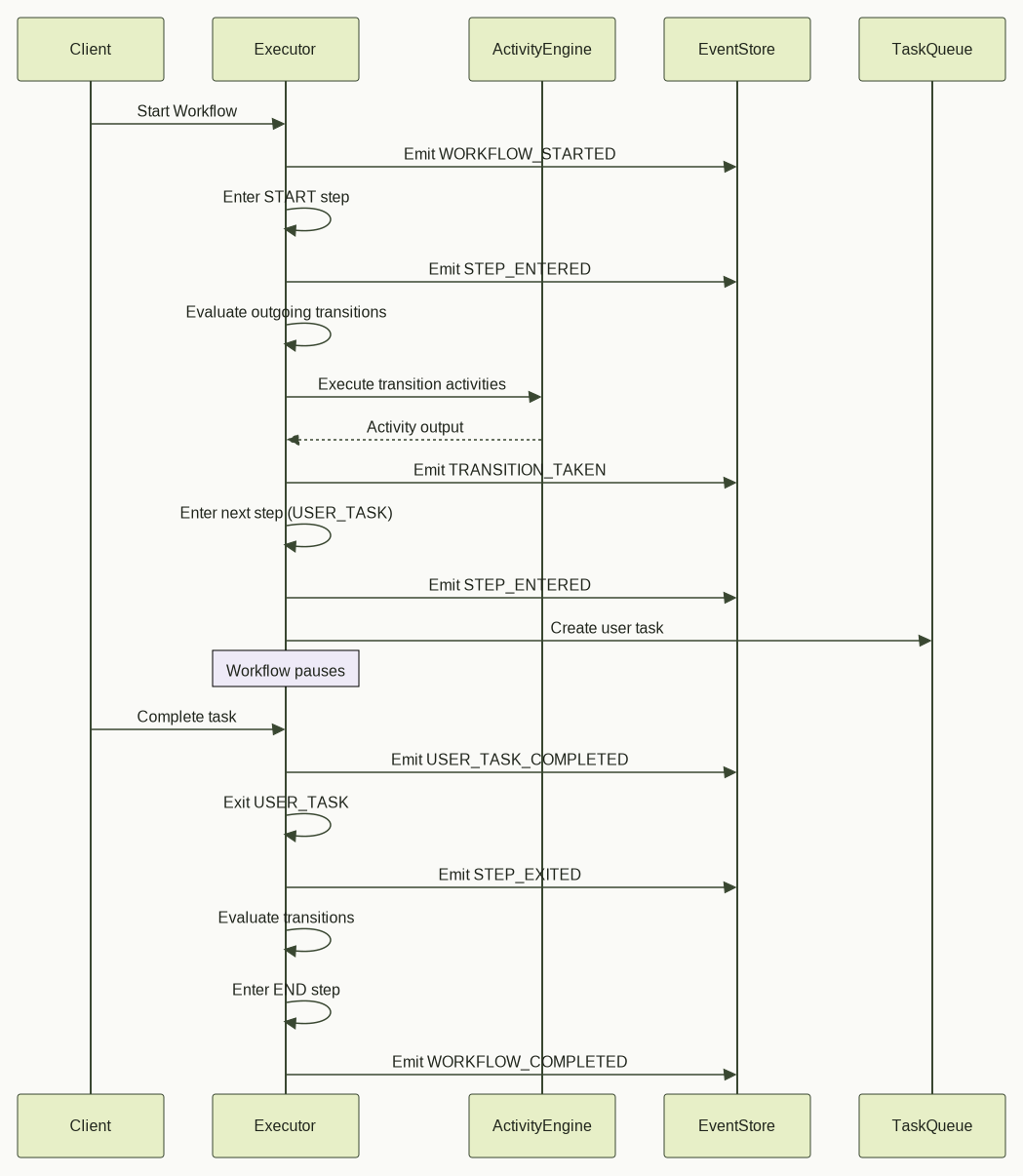
sequenceDiagram
    participant Client
    participant Executor
    participant ActivityEngine
    participant EventStore
    participant TaskQueue

    Client->>Executor: Start Workflow
    Executor->>EventStore: Emit WORKFLOW_STARTED
    Executor->>Executor: Enter START step
    Executor->>EventStore: Emit STEP_ENTERED

    Executor->>Executor: Evaluate outgoing transitions
    Executor->>ActivityEngine: Execute transition activities
    ActivityEngine-->>Executor: Activity output
    Executor->>EventStore: Emit TRANSITION_TAKEN

    Executor->>Executor: Enter next step (USER_TASK)
    Executor->>EventStore: Emit STEP_ENTERED
    Executor->>TaskQueue: Create user task

    Note over Executor: Workflow pauses

    Client->>Executor: Complete task
    Executor->>EventStore: Emit USER_TASK_COMPLETED
    Executor->>Executor: Exit USER_TASK
    Executor->>EventStore: Emit STEP_EXITED

    Executor->>Executor: Evaluate transitions
    Executor->>Executor: Enter END step
    Executor->>EventStore: Emit WORKFLOW_COMPLETED
Step-by-Step Execution:
/api/workflows/instances with initial contextWorkflow state is persisted in multiple tables:
Workflow instance status can be:
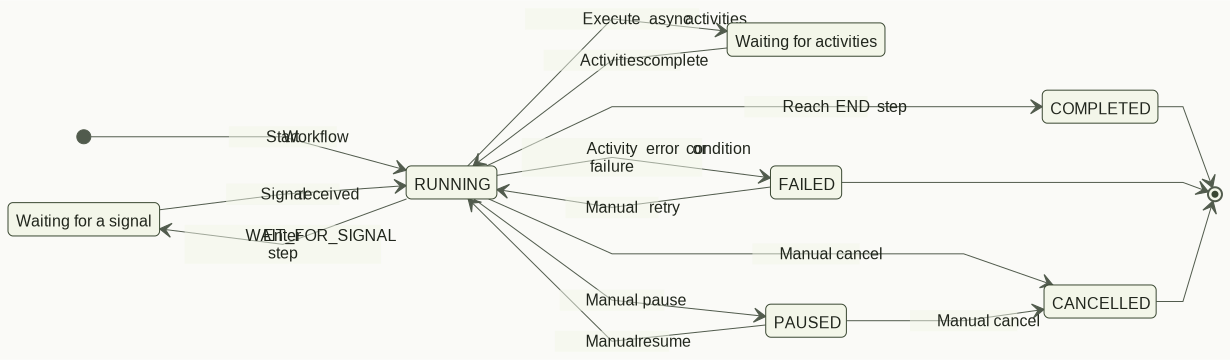
stateDiagram-v2
    direction LR
    state "Waiting for a signal" as WAITING_FOR_SIGNAL
    state "Waiting for activities" as WAITING_FOR_ACTIVITIES
    [*] --> RUNNING: Start Workflow
    RUNNING --> WAITING_FOR_SIGNAL: Enter WAIT_FOR_SIGNAL step
    RUNNING --> WAITING_FOR_ACTIVITIES: Execute async activities
    RUNNING --> PAUSED: Manual pause
    WAITING_FOR_SIGNAL --> RUNNING: Signal received
    WAITING_FOR_ACTIVITIES --> RUNNING: Activities complete
    PAUSED --> RUNNING: Manual resume
    RUNNING --> COMPLETED: Reach END step
    RUNNING --> FAILED: Activity error or condition failure
    FAILED --> RUNNING: Manual retry
    RUNNING --> CANCELLED: Manual cancel
    PAUSED --> CANCELLED: Manual cancel
    COMPLETED --> [*]
    FAILED --> [*]
    CANCELLED --> [*]
Every workflow state change emits an immutable event stored in workflow_events:
Event Types:
WORKFLOW_STARTED, WORKFLOW_COMPLETED, WORKFLOW_FAILED, WORKFLOW_CANCELLEDSTEP_ENTERED, STEP_EXITEDTRANSITION_TAKENACTIVITY_STARTED, ACTIVITY_COMPLETED, ACTIVITY_FAILEDUSER_TASK_CREATED, USER_TASK_COMPLETED, USER_TASK_CANCELLEDSIGNAL_RECEIVEDEvent Structure:
{
  id: string
  workflowInstanceId: string
  stepInstanceId: string | null
  eventType: string
  eventData: any
  occurredAt: string
  userId: string | null
  tenantId: string
  organizationId: string
}
Benefits:
workflow_events rows are the module's internal audit log. Separately, four domain events are published on the platform event bus so other modules can react without importing workflow internals:
| Event id | Emitted when |
|---|---|
workflows.task.assigned | A user task is created, with its assignee, its role queue and its entity bindings |
workflows.task.reminder_due | A configured reminder offset before the task's deadline |
workflows.task.deadline_breached | The deadline passed with the task still open |
workflows.task.portal_assigned | A task addressed to a portal principal is created – portalBroadcast: true |
The first three are emitted persistent: true and delivery is at-least-once, so subscribers must be idempotent.
workflows.task.portal_assigned is deliberately a separate, minimal event rather than portalBroadcast: true on workflows.task.assigned. The portal SSE bridge narrows to a single recipient only when the payload carries recipientUserId; workflows.task.assigned carries none, and it carries task names and entity bindings – broadcasting it would have leaked both across customers. The portal event carries { taskId, recipientUserId, tenantId, organizationId } and nothing else; the receiver asks the authorized portal API what the task is. Emission is strictly best-effort: a bus failure is logged and never breaks workflow execution.
workflows.task.assigned carries entityBindings precisely so a module that owns those records can surface the task on its own turf – the customers module subscribes and writes its own CustomerTodoLink with todoSource: 'workflows'. Direction matters: workflows only announces that a task exists and which records it is about; the module that owns the table is the module that writes to it, so workflows never touches another module's entities and a deployment without that module simply has no subscriber.
Everything in this section is additive and optional: a definition that declares none of it fails exactly as it always did.
lib/error-routing.ts is pure and is the single decision point. resolveStepFailureHandling answers, in precedence order:
kind: 'error'. It is reachable only from a failure: every normal-routing lookup (findValidTransitions, the executor's auto pre-check, evaluateTransition's auto-select, the fork/join graph walk) filters error transitions out. Following one publishes the failure into context.__error (a reserved key) and logs ERROR_ROUTED. Inside a parallel branch the route is followed with the branch token, so a handled branch failure never reaches the instance.errorDirective – fail (default), continueWithFallback or failureQueue. continueWithFallback is the directive form of the transition's legacy continueOnActivityFailure flag; that flag is untouched and byte-compatible, and the directive additionally writes fallbackValue into context under the failing step's id. A failed step instance is never flipped back to COMPLETED – the instance advances while the step stays FAILED. failureQueue parks the run on the existing PAUSED status with an engine-owned metadata.attention marker and ERROR_PARKED; GET /api/workflows/instances?attention=true lists parked runs.errorHandler – an engine construct, never an event trigger (the trigger subscriber excludes workflows.* by design). Exactly one form:
{ stepId } – a last-resort in-instance jump: the executor writes __error, moves the cursor and executes the handler step (ERROR_HANDLER_STARTED). A step never jumps to itself, which is that form's recursion guard.{ workflowId, version? } – a catch-all. completeWorkflow's FAILED branch schedules it before compensation, so the context snapshot describes the failure and it still runs when compensation throws. ERROR_HANDLER_SCHEDULED is logged inside the failing transaction and a workflow_error_handler job is enqueued; the worker starts the handler as a sub-workflow with { failedStepId, error, contextSnapshot } on its own connection. Recursion is capped by the engine-owned metadata.errorHandler.depth (WORKFLOW_MAX_ERROR_HANDLER_DEPTH = 1) – deliberately in metadata rather than context, which the context PATCH API exposes to clients. Over the cap logs ERROR_HANDLER_SKIPPED.When activities fail, compensation activities can roll back changes made earlier in the workflow.
Compensation Flow:
Configuring Compensation:
{
  activityId: "reserve-inventory",
  activityType: "CALL_API",
  config: { url: "https://inventory.example.com/reserve" },
  compensate: true,
  compensationActivity: {
    activityType: "CALL_API",
    config: { url: "https://inventory.example.com/release" }
  }
}
Use Cases:
Activities can execute asynchronously via a queue to avoid blocking workflow execution.
Async Execution Flow:
async: trueConfiguration:
{
  activityId: "generate-report",
  activityType: "EXECUTE_FUNCTION",
  async: true,
  timeout: "5m",
  config: { functionName: "generateLargeReport" }
}
Benefits:
workflow_definitions
id (UUID, PK)workflow_id (string, unique with version)version (integer)name, descriptiondefinition (JSON: steps, transitions, activities)is_active (boolean)tenant_id, organization_idworkflow_instances
id (UUID, PK)workflow_id, versionstatus (enum: RUNNING, COMPLETED, FAILED, etc.)current_step_idcontext (JSON)correlation_key (string, indexed)started_at, completed_at, updated_attenant_id, organization_idworkflow_events
id (UUID, PK)workflow_instance_id (FK, indexed)event_type (string)event_data (JSON)occurred_at (timestamp, indexed)user_id, tenant_id, organization_iduser_tasks
id (UUID, PK)workflow_instance_id (FK)step_instance_id (FK)task_name, descriptionstatus (enum: PENDING, IN_PROGRESS, COMPLETED, CANCELLED, ESCALATED)assigned_to (user ID or portal principal ID, or null)assignee_kind (varchar(20), NOT NULL, default 'user') – which id space assigned_to names: 'user' = a backoffice user, 'customer' = a portal principalassigned_to_roles (array of role names)entity_types (text[], nullable, GIN-indexed) – the distinct authored binding types, denormalized from entity_bindings at creation so the visibility gate is a WHERE instead of a lying post-filterform_data (JSON) – also carries the pressed decision under the reserved __decision keyentity_bindings (JSONB, nullable) – records the task is about, resolved at creationpriority (varchar, nullable) – authored low|medium|high|extremereassigned_by, reassigned_at, reassign_reason – reassignment auditdue_at, escalated_at, completed_at, created_at, updated_attenant_id, organization_idassignee_kind and entity_types are what make task visibility expressible in SQL: the discriminator keeps a portal-assigned row from ever matching a backoffice caller whose user id happens to collide, and the denormalized type array lets the entity gate run in the WHERE clause so pagination.total stays honest. Rows written before the migration keep entity_types = NULL, which the rule reads as "about nothing" – visible to its own assignee, invisible on the portal.
entity_bindings is a real column rather than a read of the authored form_schema blob: the Work Inbox, the record-page widget and task visibility all filter on it, and the authored form schema is the wrong shape and the wrong lifetime for that – it describes the FORM, and re-editing a definition must not retro-change what a running task is about. Reassignment is modelled as audit columns plus a workflow event rather than a new UserTaskStatus.
Performance-Critical Indexes:
workflow_instances.correlation_key - Fast lookup by external IDworkflow_instances.status - Filter by status (RUNNING, WAITING_FOR_SIGNAL)workflow_instances.updated_at - Sort by recent activityworkflow_events.workflow_instance_id, occurred_at - Event timeline queriesuser_tasks.assigned_to - User task queueuser_tasks.status - Filter tasks by statusworkflow_instance_id, step_instance_id)status + updated_at)WHERE status IN ('RUNNING', 'WAITING_FOR_SIGNAL'))See Also:
Previous: Add widgets to existing admin pages · Next: Entity Updates (UPDATE_ENTITY)