 DocsTopicsSearch docsAPI referenceDocsTopicsSearch docsAPI reference
Framework
Follow a record from its public endpoint to the command that changes it. A typical module uses a CRUD route for request handling, a command for the business operation, and the query engine to assemble the fields returned to clients.
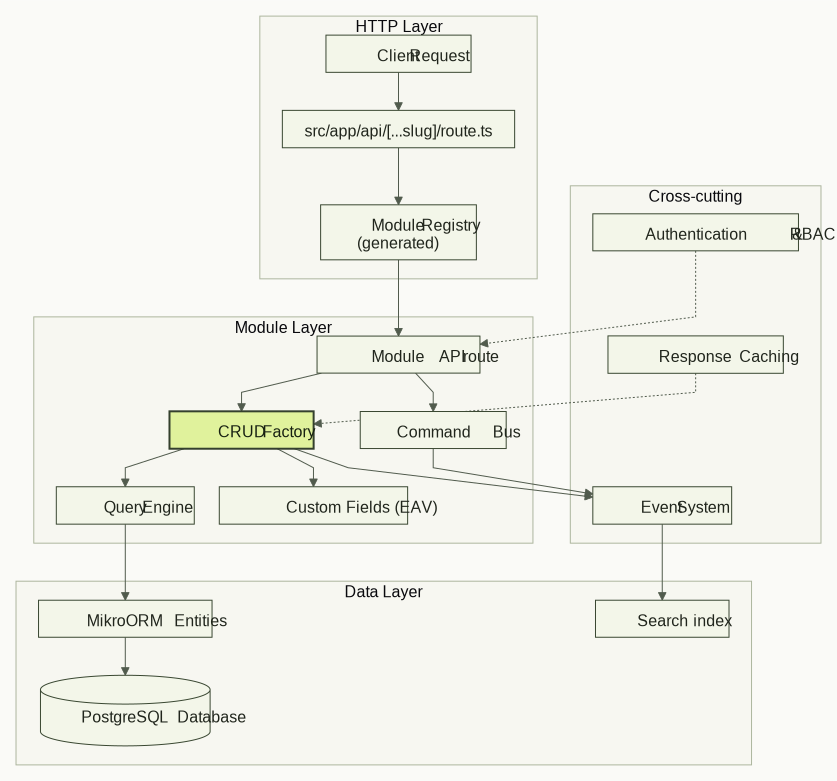
graph TB
    subgraph "HTTP Layer"
        Client["Client Request"]
        Dispatcher["src/app/api/[...slug]/route.ts"]
        Registry["Module Registry (generated)"]
    end

    subgraph "Module Layer"
        Route["Module API route"]
        CRUD["CRUD Factory"]
        Commands["Command Bus"]
        QueryEngine["Query Engine"]
        CustomFields["Custom Fields (EAV)"]
    end

    subgraph "Data Layer"
        ORM["MikroORM Entities"]
        DB[("PostgreSQL Database")]
        Search["Search index"]
    end

    subgraph "Cross-cutting"
        Events["Event System"]
        Cache["Response Caching"]
        Auth["Authentication & RBAC"]
    end

    Client --> Dispatcher
    Dispatcher --> Registry
    Registry --> Route
    Route --> CRUD
    Route --> Commands
    CRUD --> QueryEngine
    CRUD --> CustomFields
    CRUD --> Events
    Commands --> Events
    QueryEngine --> ORM
    ORM --> DB
    Events --> Search
    Auth -.-> Route
    Cache -.-> CRUD

    classDef focus fill:#e0f29c,stroke:#34402d,color:#172011,stroke-width:2px
    class CRUD focus
The CRUD factory (makeCrudRoute) is the primary tool for creating REST APIs. It provides:
import { z } from "zod";
import { makeCrudRoute } from "@open-mercato/shared/lib/crud/factory";
import { TodoEntity } from "../../data/entities";
import { E } from "@open-mercato/core/generated/entities.ids.generated";

const querySchema = z.object({
  page: z.coerce.number().min(1).default(1),
  pageSize: z.coerce.number().min(1).max(100).default(50),
  search: z.string().optional(),
  status: z.string().optional(),
});

const routeMetadata = {
  GET: { requireAuth: true, requireFeatures: ["example.todos.view"] },
  POST: { requireAuth: true, requireFeatures: ["example.todos.create"] },
  PUT: { requireAuth: true, requireFeatures: ["example.todos.edit"] },
  DELETE: { requireAuth: true, requireFeatures: ["example.todos.delete"] },
};

export const metadata = routeMetadata;

const crud = makeCrudRoute({
  metadata: routeMetadata,
  orm: {
    entity: TodoEntity,
    // Automatic tenant/org scoping
  },
  list: {
    schema: querySchema,
    entityId: E.example.todo,
    fields: ["id", "title", "status", "created_at"],
    buildFilters: async (query, ctx) => {
      const filters: Record<string, any> = {};
      if (query.search) filters.title = { $ilike: `%${query.search}%` };
      if (query.status) filters.status = { $eq: query.status };
      return filters;
    },
  },
  actions: {
    create: { commandId: "example.todos.create" },
    update: { commandId: "example.todos.update" },
    delete: { commandId: "example.todos.delete" },
  },
});

export const { GET, POST, PUT, DELETE } = crud;
Commands encapsulate business logic for mutations (Create, Update, Delete). They provide:
import { registerCommand } from "@open-mercato/shared/lib/commands";
import type { CommandHandler } from "@open-mercato/shared/lib/commands";
import {
  parseWithCustomFields,
  emitCrudSideEffects,
} from "@open-mercato/shared/lib/commands/helpers";

type CreateTodoInput = {
  title: string;
  description?: string;
  customFields?: Record<string, unknown>;
};

const createTodoCommand: CommandHandler<CreateTodoInput, { todoId: string }> = {
  id: "example.todos.create",
  async execute(rawInput, ctx) {
    // Parse input with custom fields support
    const { parsed, custom } = parseWithCustomFields(
      todoCreateSchema,
      rawInput
    );

    const em = ctx.container.resolve("em").fork();
    const todo = em.create(TodoEntity, {
      title: parsed.title,
      description: parsed.description,
      organizationId: parsed.organizationId,
      tenantId: parsed.tenantId,
    });

    em.persist(todo);
    await em.flush();

    // Handle custom fields
    if (Object.keys(custom).length > 0) {
      const de = ctx.container.resolve("dataEngine");
      await setCustomFieldsIfAny({
        dataEngine: de,
        entityId: E.example.todo,
        recordId: todo.id,
        organizationId: todo.organizationId,
        tenantId: todo.tenantId,
        values: custom,
        notify: true,
      });
    }

    // Emit events and update search index
    await emitCrudSideEffects({
      dataEngine: ctx.container.resolve("dataEngine"),
      action: "created",
      entity: todo,
      identifiers: {
        id: todo.id,
        organizationId: todo.organizationId,
        tenantId: todo.tenantId,
      },
      indexer: { entityType: E.example.todo },
    });

    return { todoId: todo.id };
  },
  // Snapshot for undo support
  captureAfter: async (input, result, ctx) => {
    // Return snapshot of created entity for undo
    return await loadTodoSnapshot(ctx.container.resolve("em"), result.todoId);
  },
  buildLog: async ({ result, ctx }) => {
    return {
      actionLabel: "Create todo",
      resourceKind: "example.todo",
      resourceId: result.todoId,
      // ... audit details
    };
  },
  undo: async ({ logEntry, ctx }) => {
    // Undo logic using snapshot
    const em = ctx.container.resolve("em").fork();
    const todoId = logEntry.resourceId;
    const todo = await em.findOne(TodoEntity, { id: todoId });
    if (todo) {
      await em.remove(todo).flush();
    }
  },
};

registerCommand(createTodoCommand);
The Query Engine provides advanced data retrieval capabilities:
$ilike, $in, $gte, etc.)const crud = makeCrudRoute({
// ...
list: {
entityId: E.customers.customer_person_profile,
fields: [
"id",
"display_name",
"primary_email",
"cf:priority", // Custom field
"cf:tags", // Another custom field
],
buildFilters: async (query, ctx) => {
const filters: Record<string, any> = { kind: { $eq: "person" } };
// Text search
if (query.search) {
filters.display_name = { $ilike: `%${query.search}%` };
}
// Custom field filters
const cfFilters = await buildCustomFieldFiltersFromQuery({
entityIds: [E.customers.customer_entity],
query,
em: ctx.container.resolve("em"),
tenantId: ctx.auth.tenantId,
});
Object.assign(filters, cfFilters);
return filters;
},
customFieldSources: [
{
entityId: E.customers.customer_person_profile,
table: "customer_people",
alias: "person_profile",
recordIdColumn: "id",
join: { fromField: "id", toField: "entity_id" },
},
],
joins: [
{
alias: "tags",
table: "customer_tag_assignments",
from: { field: "id" },
to: { field: "entity_id" },
type: "left",
},
],
},
// ...
});
Custom fields use Entity-Attribute-Value pattern for dynamic field support:
// In command - handle custom fields
const { parsed, custom } = parseWithCustomFields(schema, rawInput);

if (Object.keys(custom).length > 0) {
  await setCustomFieldsIfAny({
    dataEngine: de,
    entityId: E.example.todo,
    recordId: record.id,
    organizationId,
    tenantId,
    values: custom,
    notify: true,
  });
}

// In query - include custom fields
const crud = makeCrudRoute({
  list: {
    fields: ["id", "title", "cf:priority", "cf:tags"],
    customFieldSources: [
      {
        entityId: E.example.todo,
        table: "todos",
        recordIdColumn: "id",
      },
    ],
  },
});
Automatic OpenAPI specification generation from route definitions:
export const createTodosCrudOpenApi = createCrudOpenApiFactory({
  defaultTag: "Todos",
});

export const openApi = createTodosCrudOpenApi({
  resourceName: "Todo",
  pluralName: "Todos",
  querySchema: listSchema,
  listResponseSchema: createPagedListResponseSchema(todoItemSchema),
  create: {
    schema: todoCreateSchema,
    responseSchema: createResponseSchema,
    description: "Creates a new todo item",
  },
  update: {
    schema: todoUpdateSchema,
    responseSchema: okResponseSchema,
    description: "Updates an existing todo item",
  },
});
Create MikroORM entities and validators:
import { Entity, Property } from "@mikro-orm/postgresql";

@Entity({ tableName: "todos" })
export class TodoEntity {
  @Property({ primary: true })
  id: string;

  @Property()
  title: string;

  @Property({ nullable: true })
  description?: string;

  @Property()
  status: string;

  @Property()
  organizationId: string;

  @Property()
  tenantId: string;

  @Property()
  createdAt: Date;

  @Property({ nullable: true })
  updatedAt?: Date;
}
import { z } from "zod";

export const todoCreateSchema = z.object({
  title: z.string().min(1).max(255),
  description: z.string().optional(),
  status: z.enum(["pending", "in_progress", "completed"]),
  organizationId: z.string().uuid(),
  tenantId: z.string().uuid(),
});

export const todoUpdateSchema = todoCreateSchema.partial().extend({
  id: z.string().uuid(),
});
Implement business logic with commands:
// Create, Update, Delete commands with snapshots and undo support
Use CRUD factory to wire everything together:
// Full CRUD route with query engine, custom fields, commands
Define custom entities in ce.ts:
export const entities = [
  {
    id: E.example.todo,
    name: "Todo",
    fields: [
      {
        key: "priority",
        label: "Priority",
        kind: "select",
        options: ["low", "medium", "high"],
      },
    ],
  },
];
Define module features in acl.ts:
export const features = [
  "example.todos.view",
  "example.todos.create",
  "example.todos.edit",
  "example.todos.delete",
];
# Generate module registry
yarn generate

# Run tests
yarn test

# Generate database migrations
yarn db:generate
For non-CRUD operations:
export async function POST(request: Request, { auth }: RequestContext) {
  const container = await createRequestContainer();
  const commandBus = container.resolve("commandBus");

  const body = await request.json();
  const results = await Promise.all(
    body.todos.map((todo) =>
      commandBus.execute("example.todos.update", { ...todo, auth })
    )
  );

  return NextResponse.json({ results });
}

export const metadata = {
  POST: {
    requireAuth: true,
    requireFeatures: ["example.todos.edit"],
  },
};
const crud = makeCrudRoute({
  list: {
    entityId: E.example.todo,
    fields: ["id", "title", "assignee.name"],
    joins: [
      {
        alias: "assignee",
        table: "users",
        from: { field: "assignee_user_id" },
        to: { field: "id" },
        type: "left",
      },
    ],
    buildFilters: async (query) => {
      // Filters can reference joined tables
      return {
        "assignee.name": { $ilike: `%${query.assigneeSearch}%` },
      };
    },
  },
});
Commands automatically emit events for side effects:
// Events are emitted automatically by commands
// Listen in subscribers
export default {
  event: "example.todo.created",
  persistent: true,
  handler: async (event, ctx) => {
    // Send notification, update cache, etc.
  },
};
E.generated.tsce.ts exports custom entitiesopenApi constantyarn generate and verify command-loaders.generated.ts includes the command file and expected IDrequireAuth and organization contextOM_PROFILE=*