 DocsTopicsSearch docsAPI referenceDocsTopicsSearch docsAPI reference
Framework
Use makeCrudRoute when an entity needs the familiar list, create, update and delete operations. Start by declaring which fields each operation accepts and which capability it requires. The route can then dispatch writes through your module's commands.
The CRUD factory (makeCrudRoute) is a powerful abstraction for building consistent, multi-tenant safe REST APIs. It integrates deeply with the open-mercato architecture to provide validation, security, performance, and extensibility.
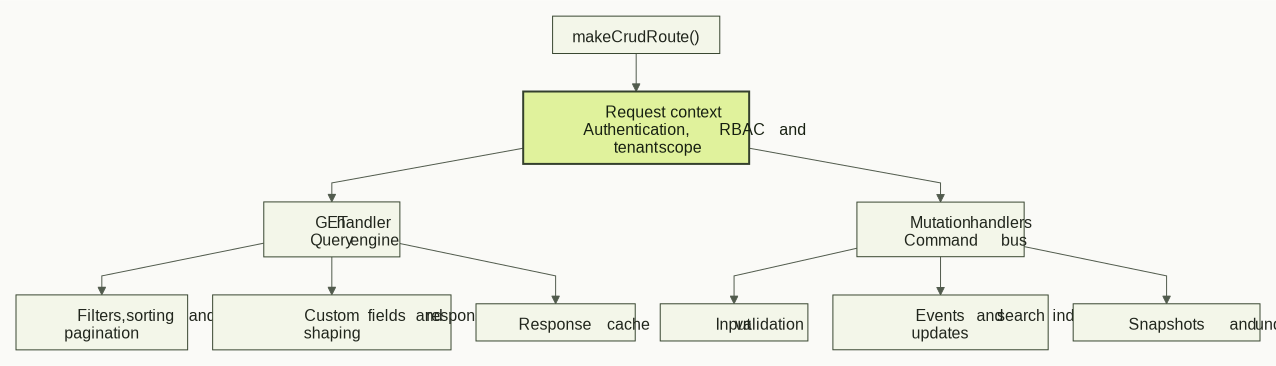
flowchart TD
 route["makeCrudRoute()"] --> ctx["Request context<br/>Authentication, RBAC and tenant scope"]
 ctx --> reads["GET handler<br/>Query engine"]
 ctx --> writes["Mutation handlers<br/>Command bus"]
 reads --> filter["Filters, sorting and pagination"]
 reads --> hydrate["Custom fields and response shaping"]
 reads --> cached["Response cache"]
 writes --> valid["Input validation"]
 writes --> events["Events and search index updates"]
 writes --> undo["Snapshots and undo"]
    classDef focus fill:#e0f29c,stroke:#34402d,color:#172011,stroke-width:2px
    class ctx focus
const crud = makeCrudRoute({
  orm: {
    entity: CustomerEntity, // MikroORM entity class
    idField: "id", // Primary key field (default: 'id')
    orgField: "organizationId", // Organization scope field (default: 'organizationId')
    tenantField: "tenantId", // Tenant scope field (default: 'tenantId')
    softDeleteField: "deletedAt", // Soft delete field (default: 'deletedAt')
  },
  // ... rest of config
});
Field Behavior:
orgField: null disables automatic organization scopingtenantField: null disables automatic tenant scopingsoftDeleteField: null disables implicit soft delete filteringDefine a route.ts under packages/<pkg>/src/modules/<module>/api/<path>/route.ts (or apps/mercato/src/modules/<module>/api/<path>/route.ts for app overrides) and use the factory.
The recommended approach is to delegate mutations to Commands and use the factory primarily for the GET (list) handler and wiring.
import { z } from "zod";
import { makeCrudRoute } from "@open-mercato/shared/lib/crud/factory";
import { TodoEntity } from "../../data/entities";
import { E } from "@/generated/entities.ids.generated";

const querySchema = z.object({
  page: z.coerce.number().min(1).default(1),
  pageSize: z.coerce.number().min(1).max(100).default(50),
  search: z.string().optional(),
});

const routeMetadata = {
  GET: { requireAuth: true, requireFeatures: ["example.todos.view"] },
  POST: { requireAuth: true, requireFeatures: ["example.todos.create"] },
  PUT: { requireAuth: true, requireFeatures: ["example.todos.edit"] },
  DELETE: { requireAuth: true, requireFeatures: ["example.todos.delete"] },
};

export const metadata = routeMetadata;

const crud = makeCrudRoute({
  metadata: routeMetadata,
  orm: {
    entity: TodoEntity,
    // defaults: idField: 'id', orgField: 'organizationId', tenantField: 'tenantId'
  },
  list: {
    schema: querySchema,
    entityId: E.example.todo,
    fields: ["id", "title", "status", "cf:priority"],
    sortFieldMap: { priority: "cf:priority" },
    buildFilters: async (query, ctx) => {
      // Return typed filters for QueryEngine
      const filters: any = {};
      if (query.search) filters.title = { $ilike: `%${query.search}%` };
      return filters;
    },
  },
  actions: {
    create: {
      commandId: "example.todos.create",
      schema: z.object({ title: z.string() }).passthrough(), // validation handled by command
    },
    update: {
      commandId: "example.todos.update",
    },
    delete: {
      commandId: "example.todos.delete",
    },
  },
});

export const { GET, POST, PUT, DELETE } = crud;
ormConfigures the MikroORM entity binding.
entity: The entity class.idField: Primary key field (default: 'id').orgField: Field for organization scope (default: 'organizationId'). Pass null to disable.tenantField: Field for tenant scope (default: 'tenantId'). Pass null to disable.softDeleteField: Field for soft deletes (default: 'deletedAt').The list configuration powers the GET endpoint using the Query Engine for advanced querying capabilities.
list: {
  schema: z.object({
    page: z.coerce.number().min(1).default(1),
    pageSize: z.coerce.number().min(1).max(100).default(50),
    search: z.string().optional(),
    status: z.enum(['active', 'inactive']).optional(),
    createdFrom: z.string().optional(),
    createdTo: z.string().optional(),
    sortField: z.string().optional(),
    sortDir: z.enum(['asc', 'desc']).optional(),
  }),
  entityId: E.customers.customer_entity,
  fields: [
    'id',
    'display_name',
    'primary_email',
    'status',
    'created_at',
    'cf:priority',    // Custom field
    'cf:tags',        // Another custom field
  ],
}
When a request carries no sortField / sort param the factory sorts by id ascending. That is only a meaningful order for sequential ids – entities with defaultRaw: 'gen_random_uuid()' primary keys get an arbitrary order that changes every time the rows are rewritten. Set defaultSort to pick the column that actually carries the domain's ordering, and tiebreakSortField to keep rows with equal primary values stable across pages and re-fetches:
list: {
  schema: listSchema,
  entityId: E.sales.sales_order_line,
  fields: lineFields,
  sortFieldMap: { lineNumber: 'line_number', createdAt: 'created_at' },
  defaultSort: { field: 'lineNumber', dir: 'asc' },
  tiebreakSortField: 'id',
}
Notes:
sortFieldMap: name the public alias when the map defines one (lineNumber), and an unmapped name is used as the column directly (which is why tiebreakSortField: 'id' works above without an id entry in the map).entityId and fields. The plain-ORM fallback list issues an unordered find and already ignores sortField today, so a route configured without entityId/fields will set defaultSort and observe no ordering at all.defaultSort.dir applies only together with defaultSort.field. An explicit sortField without a sortDir still defaults to ascending.sortField optional. A zod .default() on sortField reaches the sort resolver as an explicit request and pins the order itself, so defaultSort never takes effect.tiebreakSortField is appended as a secondary ascending sort only when it differs from the resolved primary sort, and it applies to explicit sorts too.fields)fields accepts either a static array or a function (query, ctx) => string[] that resolves the projection per request. The function form lets a route narrow the columns the Query Engine selects based on the validated query – most usefully to drop large detail-only columns (encrypted JSONB snapshots, payload blobs) from grid listings while still selecting them for single-record fetches.
This matters because those columns are fetched over the wire and decrypted per row for every list page even when no grid column renders them; the cost scales with row width × page size.
const detailOnlyColumns = new Set([
  'billing_address_snapshot',
  'shipping_address_snapshot',
  'totals_snapshot',
  'metadata',
]);

const allFields = ['id', 'number', 'status', 'customer_snapshot', ...detailOnlyColumns];
const gridFields = allFields.filter((field) => !detailOnlyColumns.has(field));

list: {
  schema: listSchema,
  entityId: E.sales.sales_order,
  // The detail page fetches a single record through this same list route with an
  // `?id=` filter (there is no separate detail endpoint), so it needs the full
  // projection. Grid listings (no `id`) use the trimmed projection.
  fields: (query) =>
    typeof query.id === 'string' && query.id.length ? allFields : gridFields,
}
Notes:
entityId and fields). The array form is fully backward compatible – pass an array whenever the projection is static.null via transformItem), so the wire contract / OpenAPI schema stays unchanged as long as those response fields are already nullable().optional().customer_snapshot is kept because the grid renders the customer name/email from it).buildFiltersThe buildFilters function transforms query parameters into Query Engine compatible filters:
buildFilters: async (query, ctx) => {
  const filters: Record<string, any> = {};

  // Basic field filters
  if (query.status) {
    filters.status = { $eq: query.status };
  }

  // Text search with ILIKE
  if (query.search) {
    filters.display_name = { $ilike: `%${query.search}%` };
  }

  // Date range filters
  if (query.createdFrom || query.createdTo) {
    const range: any = {};
    if (query.createdFrom) range.$gte = new Date(query.createdFrom);
    if (query.createdTo) range.$lte = new Date(query.createdTo);
    filters.created_at = range;
  }

  // Custom field filters (requires EM access)
  if (ctx) {
    const cfFilters = await buildCustomFieldFiltersFromQuery({
      entityIds: [E.customers.customer_entity],
      query,
      em: ctx.container.resolve("em"),
      tenantId: ctx.auth?.tenantId ?? null,
    });
    Object.assign(filters, cfFilters);
  }

  return filters;
};
Supported Filter Operators:
$eq - Equal$ne - Not equal$gt, $gte - Greater than$lt, $lte - Less than$in - In array$nin - Not in array$ilike - Case-insensitive LIKE$exists - Field exists/null checkFor entities with custom fields in related tables:
customFieldSources: [
  {
    entityId: E.customers.customer_person_profile,
    table: "customer_people", // Table name
    alias: "person_profile", // Join alias
    recordIdColumn: "id", // Column in main table
    join: {
      fromField: "id", // Field in main table
      toField: "entity_id", // Field in joined table
    },
  },
];
Define multi-table relationships:
joins: [
  {
    alias: "tag_assignments",
    table: "customer_tag_assignments",
    from: { field: "id" },
    to: { field: "entity_id" },
    type: "left", // 'left', 'inner', 'right'
  },
  {
    alias: "tags",
    table: "customer_tags",
    from: { field: "tag_assignments.tag_id" },
    to: { field: "id" },
    type: "left",
  },
];
Post-process query results:
transformItem: (item) => {
  // Remove sensitive fields
  const { password, ...safe } = item;

  // Add computed fields
  return {
    ...safe,
    displayName: item.first_name + " " + item.last_name,
    isOverdue: item.due_date && new Date(item.due_date) < new Date(),
  };
};
Enable CSV/JSON/XML export:
export: {
  enabled: true,
  formats: ['csv', 'json', 'xml'],
  filename: 'customers_export',
  columns: [
    { field: 'id', header: 'ID' },
    { field: 'display_name', header: 'Name' },
    { field: 'cf:priority', header: 'Priority' },
  ],
  batchSize: 1000,  // Process in batches for large exports
}
The actions configuration integrates with the Command Bus for business logic execution:
actions: {
  create: {
    commandId: 'customers.people.create',
    schema: z.object({}).passthrough(), // Validation before command
    mapInput: async ({ parsed, raw, ctx }) => {
      // Transform input before command execution
      const { translate } = await resolveTranslations()
      const scoped = withScopedPayload(raw, ctx, translate)
      const { base, custom } = splitCustomFieldPayload(scoped)
      return Object.keys(custom).length ? { ...base, customFields: custom } : base
    },
    response: ({ result }) => ({
      id: result?.entityId ?? result?.id ?? null,
      personId: result?.personId ?? null,
    }),
    status: 201,
  },
  update: {
    commandId: 'customers.people.update',
    schema: z.object({ id: z.string().uuid() }).passthrough(),
    mapInput: async ({ parsed, raw, ctx }) => {
      const { translate } = await resolveTranslations()
      const scoped = withScopedPayload(raw, ctx, translate)
      const { base, custom } = splitCustomFieldPayload(scoped)
      return Object.keys(custom).length ? { ...base, customFields: custom } : base
    },
    response: () => ({ ok: true }),
  },
  delete: {
    commandId: 'customers.people.delete',
    mapInput: ({ parsed }) => ({ id: parsed.id }),
    response: () => ({ ok: true }),
  },
}
events & indexerControls side effects when not using Commands (Commands handle this internally).
events: Emit standard <module>.<entity>.<action> events.indexer: Emit query_index events to keep the search index in sync.Lifecycle hooks allow injecting logic before/after operations.
hooks: {
  beforeList: async (query, ctx) => { /* ... */ },
  afterList: async (response, ctx) => { /* ... */ },
  beforeCreate: async (input, ctx) => { /* ... */ },
  afterCreate: async (entity, ctx) => { /* ... */ },
  // ... update/delete hooks
}
afterList runs on the export paths too (?format=csv|json|xml|markdown), before the file
bytes are produced, so a route that patches values in afterList exports the same shape it
serves as JSON. The hook may mutate response.items in place or replace the array outright;
either form is picked up. Note that response.total/pageSize on an export call describe the
pre-hook batch, so use response.items.length if you need the exported row count.
On exportScope=full, items are re-normalized after the hook runs – the same
_-prefixed-metadata stripping and cf_* flattening applied before the hook – so anything
afterList adds follows the full-export contract instead of leaking internal keys (such as an
error-handling branch's _associations diagnostics) into the exported file.
The CRUD factory includes sophisticated caching to improve performance:
// Environment variables
ENABLE_CRUD_API_CACHE = true; // Enable caching globally
OM_CRUD_CACHE_DEBUG = true; // Debug cache hits/misses
Cache keys include:
/api/customers/people)user: segment – the API key id, or the user id for session callers)// Example cache key structure
crud|customers.customer_entity|GET|/api/customers/people|tenant:123|selectedOrg:456|scope:456,789|user:abc|query:page=1&pageSize=50&search=test
Entries are never shared across caller identities: buildFilters, interceptor
query rewrites, and afterList/after-interceptor output can all vary per user,
and the stored payload embeds them.
When a route opts into response enrichers, the cache stores the enriched payload and appends an enrichers:<signature> segment to the key, derived from the enrichers active for the caller after ACL + tenant filtering. This partitions entries by feature cohort, so a caller never receives ACL-gated fields enriched for a different cohort.
On a cache hit the factory re-runs the active enrichers unless every one of them sets cacheableOnListHit: true – in which case the stored enriched fields are served directly (the fast path). Non-cacheable enrichers (cross-module reads, time-relative values, cross-table aggregates) keep re-running on every hit so the response stays fresh, and for those routes the cache stores the base pre-enrichment payload. See the cacheableOnListHit guidance for when to opt in.
Cache invalidation happens automatically when:
Responses include cache status headers:
x-om-cache: hit|miss - Cache statusx-om-partial-index - Partial index warnings (JSON)Enable profiling for performance analysis:
# Enable profiling for all operations
OM_PROFILE=*

# Profile specific modules
OM_PROFILE=customers.*

# Profile CRUD operations only
OM_CRUD_PROFILE=true
The factory automatically:
Routes can further trim per-request work by passing a function-form fields projection that drops large detail-only columns from grid listings, avoiding fetching and decrypting blobs the list never renders.
For large datasets, exports use:
When using commands, events are emitted automatically:
customers.person.createdcustomers.person.updatedcustomers.person.deletedSearch index updates are handled automatically:
query_index eventsmetadata: {
GET: {
requireAuth: true,
requireFeatures: ['customers.people.view'],
requireRoles: ['admin'], // Optional role requirements
},
POST: {
requireAuth: true,
requireFeatures: ['customers.people.create'],
},
// ...
}
The factory automatically:
tenantIdCrudHttpError - Structured API errors{
"error": "Validation failed",
"details": [
{
"field": "email",
"message": "Invalid email format"
}
]
}
Lifecycle hooks allow injecting custom logic:
hooks: {
  beforeList: async (query, ctx) => {
    // Pre-processing query
    console.log('Listing with filters:', query)
  },
  afterList: async (response, ctx) => {
    // Post-processing response
    response.items.forEach(item => {
      item.processed = true
    })
  },
  beforeCreate: async (input, ctx) => {
    // Validate business rules
    if (input.priority === 'high' && !ctx.auth.roles.includes('manager')) {
      throw new CrudHttpError(403, { error: 'Insufficient permissions for high priority' })
    }
    return { ...input, createdBy: ctx.auth.sub }
  },
  afterCreate: async (entity, ctx) => {
    // Side effects
    await sendNotification(ctx.container, 'Task created', entity)
  },
  // Similar for update/delete
}
describe("customers.people.create", () => {
  it("creates person with custom fields", async () => {
    const { result } = await executeCommand("customers.people.create", {
      displayName: "John Doe",
      primaryEmail: "[email protected]",
      "cf:department": "Engineering",
    });

    expect(result.entityId).toBeDefined();
  });
});
describe("GET /api/customers/people", () => {
  it("returns paginated results", async () => {
    const response = await app.request(
      "/api/customers/people?page=1&pageSize=10"
    );
    expect(response.status).toBe(200);

    const data = await response.json();
    expect(data.items).toHaveLength(10);
    expect(data.total).toBeGreaterThan(10);
  });
});
The factory seamlessly integrates with the EAV system:
list.fields can include cf:<key> to fetch values. customFieldSources allow fetching fields from related profiles.parseWithCustomFields and setCustomFieldsIfAny helpers inside your command.With a reader, verify that a list loads but a change is refused. With an editor, update one record and read it back. With a user in another tenant, request that record by ID. Record ownership and feature permission are independent checks.