 DocsTopicsSearch docsAPI referenceDocsTopicsSearch docsAPI reference
Build an application
A retail visitor and a wholesale buyer can open the same product URL and qualify for different prices or assortments. Start by resolving the store serving the request. Carry that shopper's session through the catalog and cart calls so the basket reflects what the shopper can buy.
Use a development instance with the Ecommerce, Catalog and Cart modules enabled, a configured store domain, and at least one product visible in that store. Call GET /api/ecommerce/storefront/context from the store's hostname. The endpoint resolves the host and optional portal session into a store and buyer context. A 404 here means the host or path has no matching store. Check the domain binding before investigating the product list.
GET /api/ecommerce/storefront/products with the same host and buyer session. Pick a visible product and, if it has variants, its sellable variant. Use its identifiers in the add-line request.POST /api/cart/current with an empty JSON object. A 201 response contains the new basket and its cart.token. Store that token for this shopper. It is returned at creation and is needed for subsequent calls.POST /api/cart/current/lines with the token in the X-Cart-Token header. Include productId, the applicable variantId and a decimal-string quantity such as "2". A stable Idempotency-Key on this request lets a network retry refer to the same add operation.GET /api/cart/current with the same token. Show any returned price changes or warnings when the buyer reviews the basket.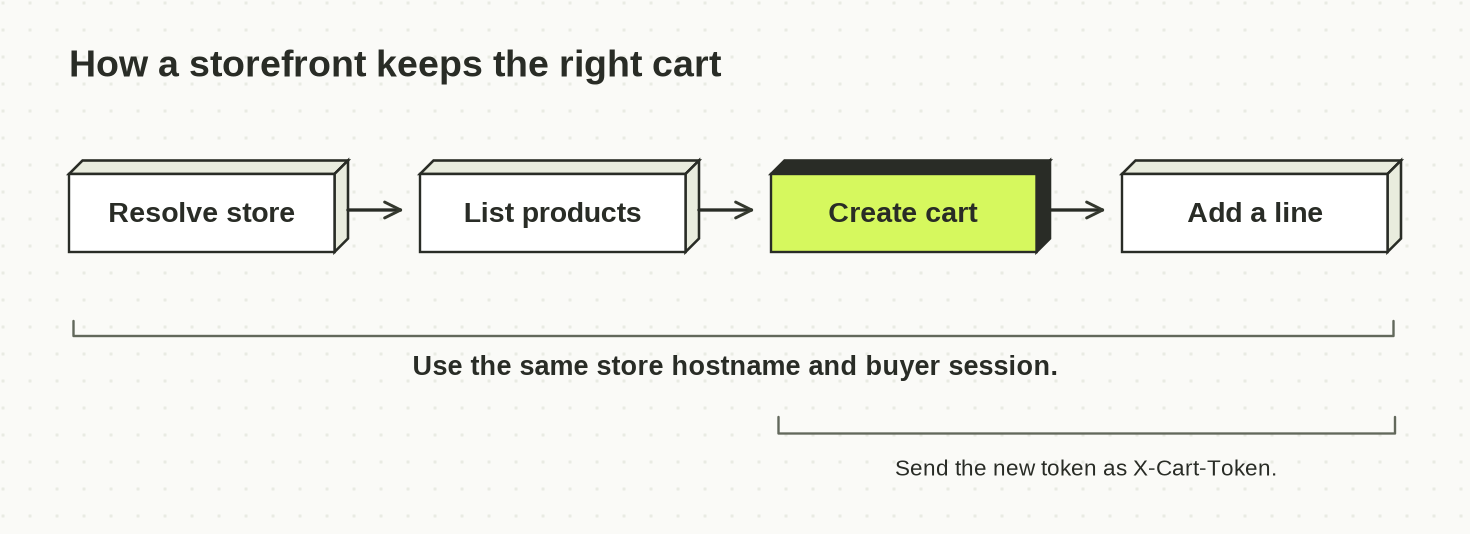
Try one public item as a guest, then sign in with a test wholesale buyer. Verify the assortment and prices for that identity. The cart rechecks visibility when buyer context changes and on merge or lock. Treat the server's current basket as the amount shown to the buyer, even if the page still has a previous product price in memory.
A cart token grants access to a basket. Keep it out of links and logs. If a basket read returns 404, first check whether the storefront sent X-Cart-Token for this shopper. If the request reaches a locked basket, handle the checkout in progress before offering another edit.
Store context endpoint · Cart API reference · Cart line request and responses