 DocsTopicsSearch docsAPI referenceDocsTopicsSearch docsAPI reference
User guide
An action describes what happens after a rule evaluates. Configure the success and failure paths separately, then test the message with representative record values.
Actions execute based on condition results:
| Action | Purpose | Configuration | Example |
|---|---|---|---|
| ALLOW_TRANSITION | Allow state transition (GUARD rules) | None | Allow work order release |
| BLOCK_TRANSITION | Block transition + error message | message | "Materials not available" |
| LOG | Write to execution logs | level (info/warn/error/debug), message | "Order {{orderId}} approved" |
| SHOW_ERROR | Display error to user | message | "Exceeds credit limit" |
| SHOW_WARNING | Display warning to user | message | "Below minimum quantity" |
| SHOW_INFO | Display info to user | message | "Submitted for approval" |
| NOTIFY | Send notifications | recipients, message | Recipients: [email protected] |
| SET_FIELD | Update entity field | field, value | field: status, value: "APPROVED" |
| CALL_WEBHOOK | HTTP request to external URL | url, method, payload | POST https://api.example.com |
| EMIT_EVENT | Emit domain event | eventName, payload | Event: order.approved |
💡 GUARD rules: Use BLOCK_TRANSITION as failure action to prevent operations.
Use {{field}} syntax for dynamic values:
"Order {{orderId}} assigned to {{assignedTo}}""Customer {{customer.name}} from {{customer.address.city}}""Approved by {{user.email}} on {{today}}""Order {{orderId}} total {{total}} exceeds {{threshold}}"Success (conditions true):
Failure (conditions false):
Example:
Conditions: orderTotal > 10000
Success: SET_FIELD status="PENDING_APPROVAL", NOTIFY approver
Failure: SHOW_INFO "No approval needed"
Actions execute top-to-bottom. Use arrow buttons to reorder.
Order matters:
Example: LOG → SET_FIELD → SHOW_INFO → NOTIFY → EMIT_EVENT
Validation: System checks required fields, field paths, URLs, JSON syntax, and interpolation.
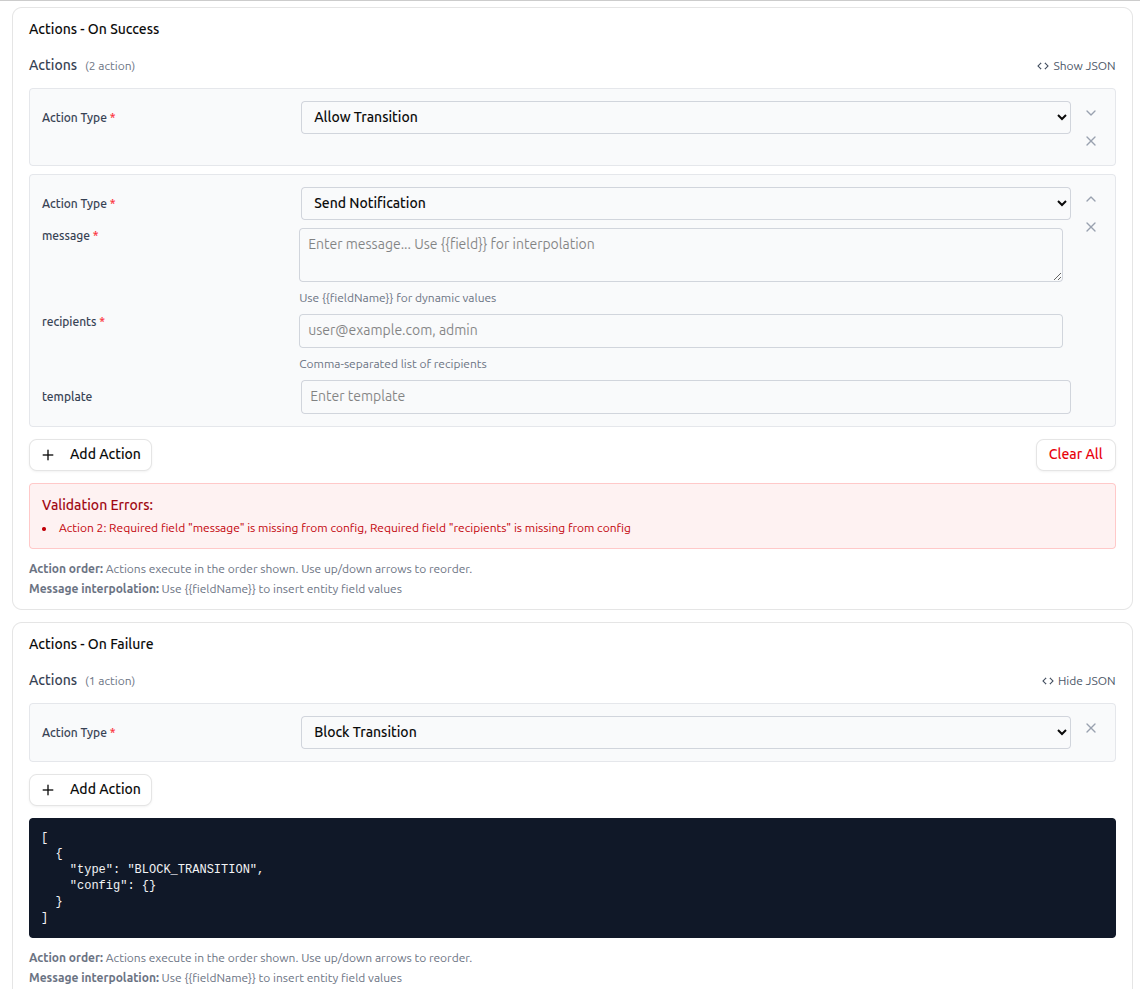 Action builder showing success and failure actions with configuration forms and reordering controls
Approval Workflow:
Success: SET_FIELD status="PENDING_APPROVAL", NOTIFY approver, SHOW_INFO
Guard with Feedback:
Failure: BLOCK_TRANSITION, SHOW_ERROR, LOG error, NOTIFY admin
Audit Trail:
Success: LOG "{{operation}} by {{user.email}}", SET_FIELD lastModified
External Integration:
Success: LOG, CALL_WEBHOOK, EMIT_EVENT entity.synced
| Issue | Check |
|---|---|
| Action not executing | Correct section (success/failure), conditions evaluating properly, execution logs |
| Interpolation failing | Field path syntax, field exists, execution logs for undefined values |
| Webhook failures | URL accessible, authentication, endpoint logs, JSON syntax |
| Field not setting | Field path correct, field writable, value type matches |