 DocsTopicsSearch docsAPI referenceDocsTopicsSearch docsAPI reference
User guide
Build a condition from a field, an operator and a comparison value. Group related conditions so you can tell whether one of them or all of them must match.
Build conditions visually to determine when rules apply. Conditions evaluate entity data against criteria you define.
Simple Condition: field operator value
orderTotal > 1000Group Condition: Combine multiple conditions with AND/OR
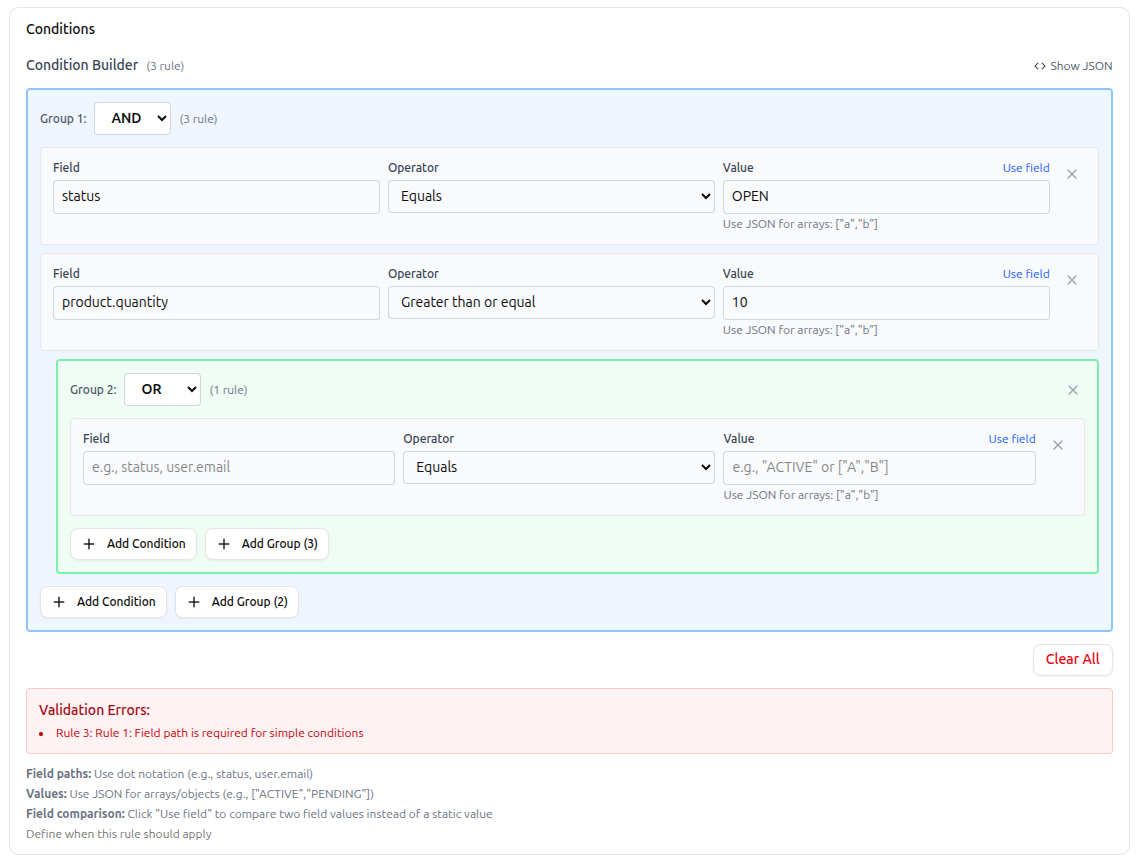 Condition builder showing simple conditions and nested AND/OR groups
AND:
  - status = "PENDING"
  - orderTotal > 5000
  OR:
    - customerTier = "GOLD"
    - customerTier = "PLATINUM"
Use dot notation to access data:
status, quantityuser.email, address.cityitems[0].productId, tags[2] (zero-based)Invalid paths show error indicators.
| Operator | Description | Example |
|---|---|---|
=, == | Equals | status = "ACTIVE" |
!= | Not equals | status != "DELETED" |
>, >=, <, <= | Comparison | orderTotal > 1000 |
IN | In list | status IN ["ACTIVE", "PENDING"] |
NOT_IN | Not in list | status NOT_IN ["DELETED"] |
CONTAINS | Array contains | tags CONTAINS "urgent" |
NOT_CONTAINS | Array not contains | tags NOT_CONTAINS "archived" |
STARTS_WITH | String prefix | email STARTS_WITH "admin" |
ENDS_WITH | String suffix | filename ENDS_WITH ".pdf" |
MATCHES | Regex match | phone MATCHES "^\\+1" |
IS_EMPTY | Null/empty check | description IS_EMPTY |
IS_NOT_EMPTY | Has value | assignedTo IS_NOT_EMPTY |
"ACTIVE", "[email protected]"1000, 3.14true, false["ACTIVE", "PENDING"] (for IN/NOT_IN){"min": 10, "max": 100}{{today}}, {{now}}, {{yesterday}}, {{tomorrow}}{{user.id}}, {{user.email}}, {{user.name}}{{entity.id}}, {{entity.tenantId}}, {{entity.organizationId}}Examples:
expiryDate < {{today}}
createdBy = {{user.id}}
deadline <= {{tomorrow}}
Compare two fields instead of field to value. Click "Use field" to toggle.
plannedEndDate < actualEndDate
status)Validation: System checks field paths, operators, and value formats automatically.
Click Show JSON to view/debug the raw condition structure.
Range Check:
AND: quantity >= 10, quantity <= 100
Multiple Options:
status IN ["ACTIVE", "PENDING", "APPROVED"]
Exclusion:
status NOT_IN ["DELETED", "ARCHIVED"]
Date Range:
AND: createdAt >= {{2024-01-01}}, createdAt < {{2024-12-31}}
Required Fields:
AND: firstName IS_NOT_EMPTY, lastName IS_NOT_EMPTY, email IS_NOT_EMPTY
Complex Logic:
AND:
  - orderType = "WHOLESALE"
  - orderTotal > 10000
  OR:
    AND: customerTier = "GOLD", accountAge > 365
    - customerTier = "PLATINUM"
{{today}}, {{user.id}}) where applicable| Issue | Check |
|---|---|
| Always true/false | Field paths, value types, operators, AND/OR logic |
| Evaluation errors | Execution logs, field path validity, JSON syntax, regex patterns |
| Case sensitivity | Strings are case-sensitive |