 DocsTopicsSearch docsAPI referenceDocsTopicsSearch docsAPI reference
User guide
Connect S3-compatible storage to the Storage Hub and choose how the application uses it. Verify access against the intended bucket before uploading application files.
The Storage Hub lets you route attachment storage to a cloud object store instead of the local filesystem. Once configured, all new file uploads for an attachment partition are transparently written to S3 (or any S3-compatible service). Existing local-filesystem attachments continue to work side-by-side with no data migration required.
Open Mercato uses a pluggable storage driver architecture. Each attachment partition declares which driver to use (local by default). When you configure S3 credentials and switch a partition's driver, all new uploads for that partition go to S3 while reads from older local-filesystem files continue to work through the local driver.
The integration also exposes standalone S3 API endpoints that let you upload, download, delete, and pre-sign URLs for files entirely outside the attachments module – useful for custom integrations or workflows that need direct S3 access.
storage_s3 module must be enabled. Set OM_ENABLE_STORAGE_S3=true in your environment and restart the app.storage_providers.manage feature enabled for your role (granted to superadmin and admin by default).Add the environment variable to your deployment before starting the app:
OM_ENABLE_STORAGE_S3=true
After the first start with this flag set, the S3 integration card appears in External Systems → Integrations.
| Field | Required | Description |
|---|---|---|
| Access Key ID | Yes | AWS access key ID (or equivalent for your provider) |
| Secret Access Key | Yes | AWS secret access key |
| Region | Yes | e.g. us-east-1, eu-west-1, nyc3 for DigitalOcean |
| Bucket | Yes | Name of the pre-created bucket |
| Endpoint URL | No | Custom endpoint for non-AWS providers (see table below) |
| Force Path Style | No | Required for MinIO and some self-hosted S3 services |
| Provider | Endpoint URL | Force Path Style |
|---|---|---|
| AWS S3 | (leave blank) | No |
| DigitalOcean Spaces | https://<region>.digitaloceanspaces.com | No |
| MinIO (self-hosted) | http://<host>:<port> | Yes |
| Cloudflare R2 | https://<account-id>.r2.cloudflarestorage.com | No |
| Backblaze B2 | https://s3.<region>.backblazeb2.com | No |
The provider must enforce atomic conditional PUT with If-None-Match: *. Attachment and standalone S3 uploads send this header so a new upload cannot overwrite an existing object, including objects not yet tracked by quota accounting. Supporting the S3 API or accepting this header without enforcing it is insufficient.
| Provider | Conditional PUT compatibility |
|---|---|
| AWS S3 | Documents create-only writes using If-None-Match: *. |
| MinIO | AIStor documents If-None-Match on PutObject. Verify the installed server version, especially older or community deployments. |
| Cloudflare R2 | Documents atomic conditional PutObject, including rejecting concurrent writes to the same key. |
| DigitalOcean Spaces | Its S3 compatibility reference does not explicitly confirm conditional PUT semantics. Verify with the provider and test the target endpoint before using it for uploads. |
| Backblaze B2 | Its S3 PutObject reference does not explicitly confirm If-None-Match support. Verify with the provider and test the target endpoint before using it for uploads. |
These are provider documentation references, not results of Open Mercato live-provider certification. In a disposable test bucket, confirm that a conditional PUT to a new key succeeds and a second conditional PUT to that key fails while preserving the original bytes. A passing connection health check only checks bucket access; it does not verify conditional writes. Repeat compatibility checks after provider or proxy upgrades.
When quota accounting already knows the target key, standalone upload admission returns 409. If the object exists only at the provider, the provider rejects the conditional write (AWS S3 uses 412 Precondition Failed; concurrent operations can return 409). Open Mercato surfaces a failed upload; provider status codes are not necessarily passed through unchanged. Choose a new key instead of retrying an overwrite.
A provider that rejects conditional PUT as unsupported causes uploads to fail. A provider or intermediary that silently ignores the header can permit overwrites and is incompatible with the storage safety guarantees. Do not remove the header to work around an upload failure.
After saving, open the Health tab and click Check Health to confirm the credentials are valid and the bucket is reachable.

If the check fails, review the error message. Common causes: wrong region, bucket does not exist, or missing s3:PutObject / s3:GetObject permissions on the IAM policy.
OM_ENABLE_STORAGE_S3=true is set and the app was restarted.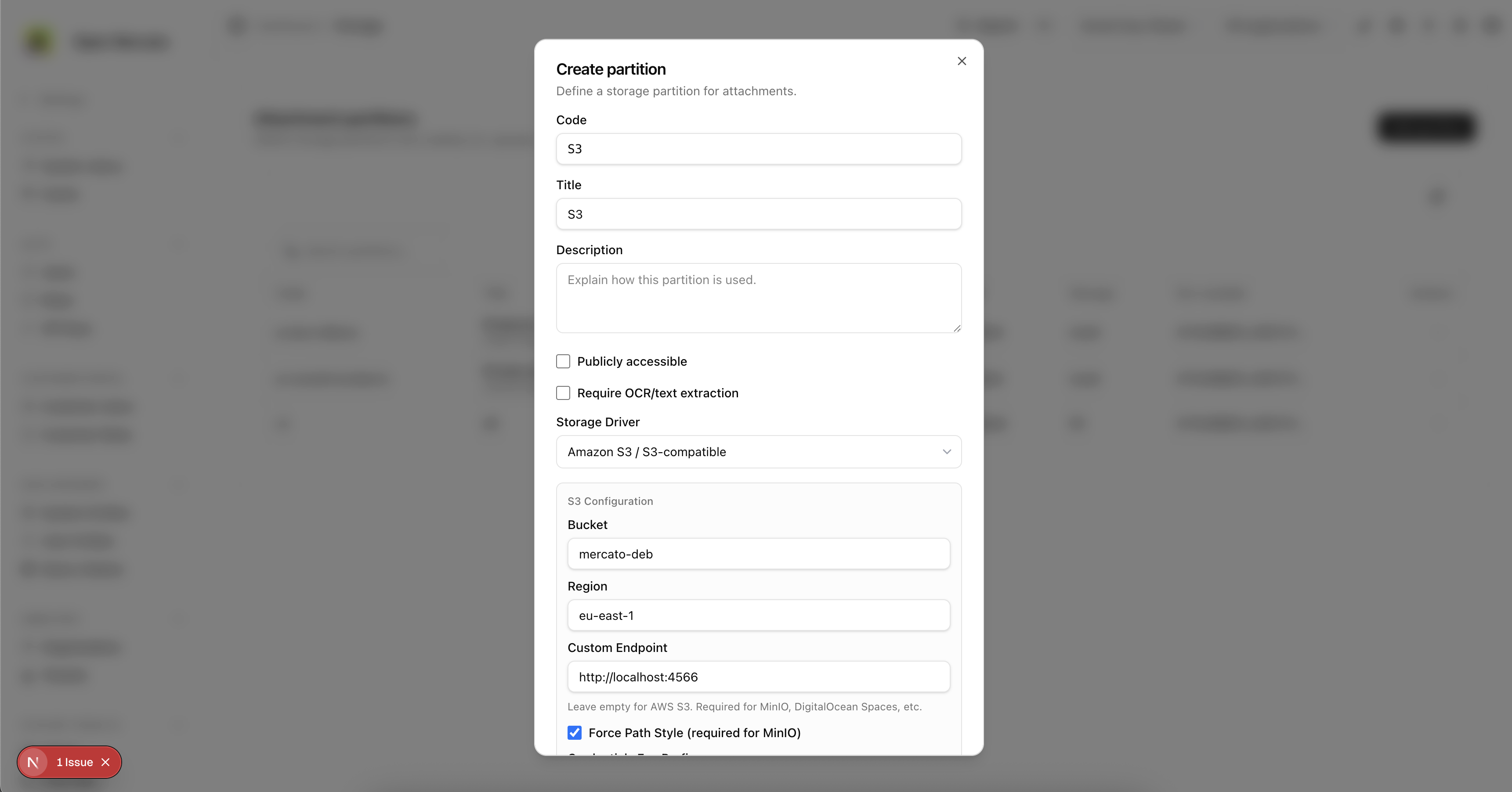
All new files uploaded to this partition from this point forward are stored in S3. The key structure used inside the bucket is:
<partition-code>/org_<orgId>/tenant_<tenantId>/<timestamp>_<uuid>_<filename>
Info
Existing files already uploaded to the local filesystem remain accessible and are served through the local driver. You do not need to migrate them unless you want to.
If your deployment already has S3 credentials at boot time, you can skip the UI form by setting env vars:
OM_ENABLE_STORAGE_S3=true
OM_INTEGRATION_STORAGE_S3_ACCESS_KEY_ID="<om-integration-storage-s3-access-key-id>"
OM_INTEGRATION_STORAGE_S3_SECRET_ACCESS_KEY="<om-integration-storage-s3-secret-access-key>"
OM_INTEGRATION_STORAGE_S3_REGION=us-east-1
OM_INTEGRATION_STORAGE_S3_BUCKET=my-mercato-bucket
# Optional:
# OM_INTEGRATION_STORAGE_S3_SESSION_TOKEN=
# OM_INTEGRATION_STORAGE_S3_ENDPOINT=https://nyc3.digitaloceanspaces.com
# OM_INTEGRATION_STORAGE_S3_FORCE_PATH_STYLE=true
# OM_INTEGRATION_STORAGE_S3_FORCE_PRECONFIGURE=false
OM_ENABLE_STORAGE_S3=true is the module-enablement gate: without it the storage_s3 module is not registered in enabledModules and the rest of the OM_INTEGRATION_STORAGE_S3_* block is ignored. The two layers are intentionally separate so you can preview the integration card in the UI without preconfiguring credentials.
On new tenant setup the module reads OM_INTEGRATION_STORAGE_S3_* and pre-populates the Integration Marketplace credentials so no manual configuration step is needed. Setup failures (for example a partial env block) are surfaced through the Integrations → Logs UI under the storage_s3 filter, so operators can see them alongside other integration activity.
onTenantCreated only runs once per tenant. If you upgrade an existing deployment after setting the OM_INTEGRATION_STORAGE_S3_* block, rerun the provider CLI to apply the preset to a tenant that was provisioned before the variables were available:
yarn mercato storage_s3 configure-from-env --tenant <tenantId> --org <organizationId>
Behavior:
Skipped: No S3 env preset was found. and exits 0. Safe to call from a startup hook.1 with Incomplete S3 env preset so CI/automation can detect misconfiguration.Skipped: S3 credentials already exist. and exits 0 unless you pass --force or set OM_INTEGRATION_STORAGE_S3_FORCE_PRECONFIGURE=true.--force) → writes the credentials and adds an entry to the integration logs.Use --force when you want to roll keys without going through the Integrations UI:
yarn mercato storage_s3 configure-from-env \
  --tenant <tenantId> \
  --org <organizationId> \
  --force
--all-tenants)For unattended deploys – Dokploy, Coolify, Kamal, plain docker run, etc. – you usually do not want to track tenant and organization UUIDs in your deploy configuration. Use --all-tenants instead: the CLI iterates every active organization in the database and applies the preset to each (tenantId, organizationId) pair.
yarn mercato storage_s3 configure-from-env --all-tenants
Use it as a post-deploy / release hook in your platform (e.g. a Dokploy "deploy command", a Kamal accessory post-deploy, a Coolify "after deployment" step). On every redeploy, the command:
OM_INTEGRATION_STORAGE_S3_* block from the process environment once.applyS3EnvPreset per-scope, with the same per-tenant skip / --force semantics – already-configured tenants are skipped automatically, fresh tenants get the preset.Exit code semantics:
0. Safe to wire into every release hook.OM_INTEGRATION_STORAGE_S3_* var is missing) → every scope errors → exit 1. CI/automation can detect misconfiguration without parsing stdout.1. The summary line reports the breakdown.mercato init) → exit 0 with a "Nothing to do" message.--all-tenants cannot be combined with --tenant / --org. Pick one mode per invocation.
For local development and integration testing you can run a local S3 stub using LocalStack. Start it alongside the other infrastructure services by enabling the storage-s3 compose profile:
docker compose --project-directory . -f starters/docker/compose.infra.yml --profile storage-s3 up -d
Then configure your local .env:
OM_ENABLE_STORAGE_S3=true
OM_INTEGRATION_STORAGE_S3_ACCESS_KEY_ID="<om-integration-storage-s3-access-key-id>"
OM_INTEGRATION_STORAGE_S3_SECRET_ACCESS_KEY="<om-integration-storage-s3-secret-access-key>"
OM_INTEGRATION_STORAGE_S3_REGION=us-east-1
OM_INTEGRATION_STORAGE_S3_BUCKET=mercato-dev
OM_INTEGRATION_STORAGE_S3_ENDPOINT=http://localhost:4566
OM_INTEGRATION_STORAGE_S3_FORCE_PATH_STYLE=true
Create the test bucket before the first run:
aws --endpoint-url=http://localhost:4566 s3api create-bucket --bucket mercato-dev
Note
LocalStack is not included in the default yarn infra:up. It only starts when the storage-s3 profile is active to keep the default dev loop lightweight.
The storage_s3 module also exposes API endpoints for direct S3 file operations without going through the attachments module. All routes require authentication and the storage_providers.manage feature.
All keys passed to these endpoints must be scoped to the authenticated tenant's org_<orgId>/tenant_<tenantId>/ namespace.
| Method | Path | Description |
|---|---|---|
POST | /api/storage-providers/s3/upload | Upload a file (multipart/form-data) |
GET | /api/storage-providers/s3/download?key=… | Download a file by S3 key |
POST | /api/storage-providers/s3/signed-url | Generate a pre-signed upload or download URL |
DELETE | /api/storage-providers/s3/delete | Delete a file by S3 key |
GET | /api/storage-providers/s3/list?prefix=… | List files by prefix (auto-scoped to tenant) |
curl -X POST https://your-app/api/storage-providers/s3/upload \
  -H "Authorization: Bearer <token>" \
  -F "file=@/path/to/document.pdf"
Response:
{
  "key": "uploads/org_<orgId>/tenant_<tenantId>/1714300000000_abc123_document.pdf",
  "bucket": "my-mercato-bucket",
  "size": 104523,
  "contentType": "application/pdf"
}
curl -X POST https://your-app/api/storage-providers/s3/signed-url \
  -H "Authorization: Bearer <token>" \
  -H "Content-Type: application/json" \
  -d '{"key":"uploads/org_x/tenant_y/file.pdf","operation":"download","expiresIn":3600}'
Response:
{
  "url": "https://my-bucket.s3.amazonaws.com/uploads/...?X-Amz-Signature=...",
  "expiresAt": "2026-04-28T14:00:00.000Z"
}
For operation: "upload", supply size in bytes when the file size is known. For example, this request reserves 1 MiB for a 1 MiB file:
{
  "key": "uploads/org_<orgId>/tenant_<tenantId>/document.pdf",
  "operation": "upload",
  "contentType": "application/pdf",
  "size": 1048576,
  "expiresIn": 3600
}
The response includes url, expiresAt, and reservationId. Send the file bytes with PUT to the returned one-time application upload URL. The upload proxy enforces size as an upper bound; a larger body is rejected with 413. Download URLs do not reserve upload capacity, and size is ignored for downloads.
Omitting size remains supported, but reserves the configured maximum upload size from resolveAttachmentMaxBytes() instead of the eventual file size. The default is 25 MiB, controlled by OM_ATTACHMENT_MAX_UPLOAD_MB (legacy alias: OPENMERCATO_ATTACHMENT_MAX_UPLOAD_MB). Several unused URLs can therefore exhaust the tenant's available quota even when their intended files are small. Supplying the exact byte size avoids unnecessarily reserving that extra capacity.
After a successful upload, accounting commits the actual bytes stored and releases the unused portion of the reservation. An unused URL retains its reservation until its lease expires and the recovery worker reconciles it. expiresIn controls the initial URL lifetime (default 3,600 seconds; allowed range 60–604,800 seconds). Expiry prevents starting an upload with that token; it does not guarantee that quota is released at that exact instant.
Recovery releases capacity after confirming that no object remains, or commits a valid completed object's actual size. An upload already in progress can require additional lease time and a second absence check. Provider errors or uncertain cleanup keep capacity reserved while recovery retries. Keep the quota-recovery worker operating; allow reconciliation to complete before treating expired URLs as free capacity.
| Feature | Grants |
|---|---|
storage_providers.manage | Configure integration credentials, use standalone S3 API |
The storage_providers.manage feature is granted to superadmin and admin roles by default. No additional role configuration is needed for standard setups.
| Symptom | Likely cause | Fix |
|---|---|---|
Upload fails with NoSuchBucket | Bucket does not exist in the specified region | Create the bucket or correct the region/endpoint |
| Upload returns 403 from S3 | IAM policy missing s3:PutObject | Add s3:GetObject, s3:PutObject, s3:DeleteObject, s3:ListBucket to the policy |
MinIO returns InvalidAccessKeyId | forcePathStyle not set | Enable Force Path Style in the credentials form |
| Attachment served as 404 after switching partition driver | File was uploaded before driver switch | The file is still on local disk – switch the partition back to local, or re-upload |
S3 integration is not configured error | OM_ENABLE_STORAGE_S3 not set or credentials not saved | Verify env var and re-save credentials via Integrations |
Previous: Self-service onboarding · Next: Stripe Payment Gateway