 DocsTopicsSearch docsAPI referenceDocsTopicsSearch docsAPI reference
User guide
Group rules that should be evaluated together. Review the order and membership when a decision depends on more than one rule.
Rule sets group related rules together, providing organizational structure and bulk management capabilities. Use sets to organize rules by business domain, workflow, or functional area.
A rule set is a collection of business rules that:
Example Sets:
Organization: Group related rules by domain instead of managing a flat list of hundreds of rules.
Bulk Management: Enable/disable entire sets at once for testing, maintenance, or feature toggles.
Execution Control: Define precise execution order within a set using sequence numbers.
Per-Rule Control: Enable/disable individual rules within a set without affecting the rule globally.
Documentation: Sets provide context - rules make more sense when grouped with related rules.
Set ID:
QUALITY_CONTROL_RULES)Set Name:
Description:
Enabled:
Click Create Rule Set to save. You'll be redirected to the set detail page where you can add rules.
From the rule set detail page:
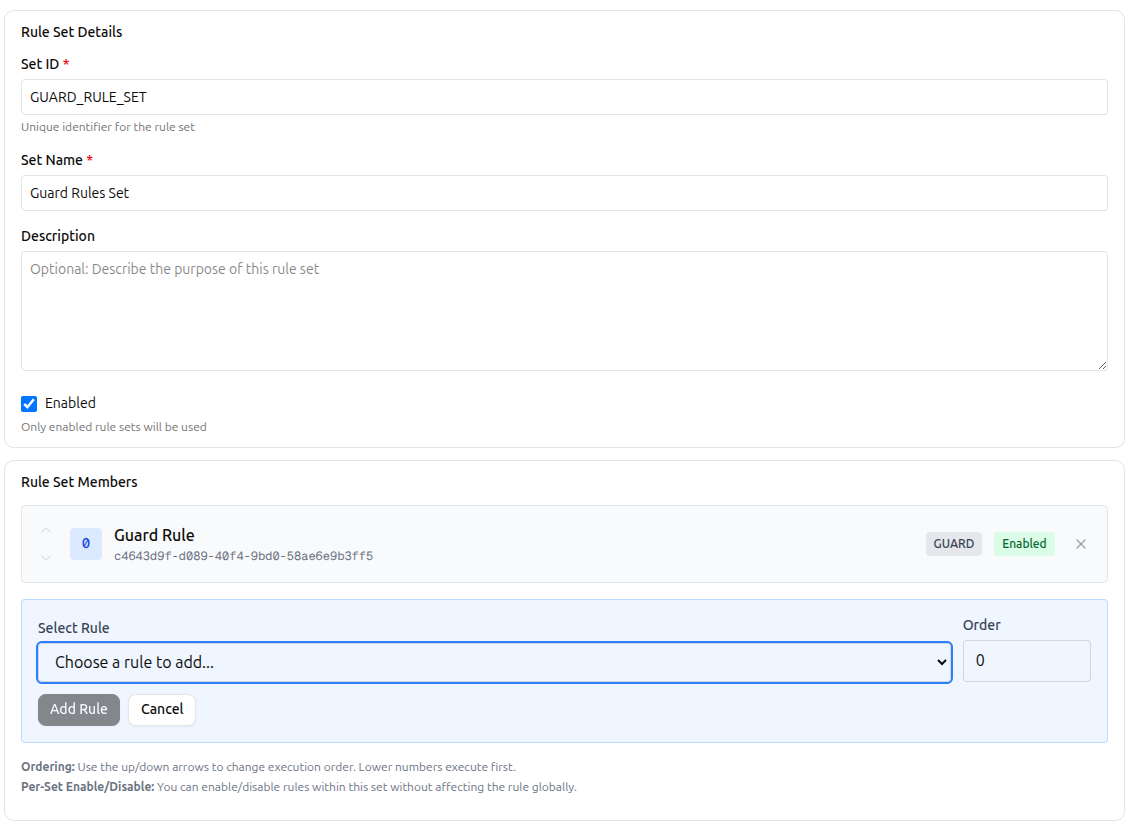 Add rule to set dialog showing rule selection, sequence input, and enabled toggle
Each rule in a set is called a "member" with these properties:
Sequence:
Enabled:
Actions:
Rules in a set execute in sequence order:
Sequence 10: Check material availability (GUARD)
Sequence 20: Validate work order data (VALIDATION)
Sequence 30: Calculate priority score (CALCULATION)
Sequence 40: Set assignment fields (ASSIGNMENT)
Sequence 50: Notify production team (ACTION)
Best Practices:
Three States:
Use Cases:
Feature Toggle:
Set: BETA_FEATURES (Enabled: false)
  - Rule: NEW_VALIDATION (Member Enabled: true)
  - Rule: EXPERIMENTAL_CALC (Member Enabled: true)

Toggle the entire set on/off to enable/disable beta features
A/B Testing:
Set A: DISCOUNT_STRATEGY_A (Enabled: true)
  - Rule: VOLUME_DISCOUNT (Member Enabled: true)

Set B: DISCOUNT_STRATEGY_B (Enabled: false)
  - Rule: TIERED_DISCOUNT (Member Enabled: true)

Enable one set at a time to test different strategies
Phased Rollout:
Set: QUALITY_PHASE_1 (Enabled: true)
  - Rule: BASIC_CHECKS (Member Enabled: true)
  - Rule: ADVANCED_CHECKS (Member Enabled: false) // Not ready yet

Enable advanced checks when ready without creating new set
Global Rules:
Set Rules:
A Rule Can Be:
Shows all rule sets with:
Filters:
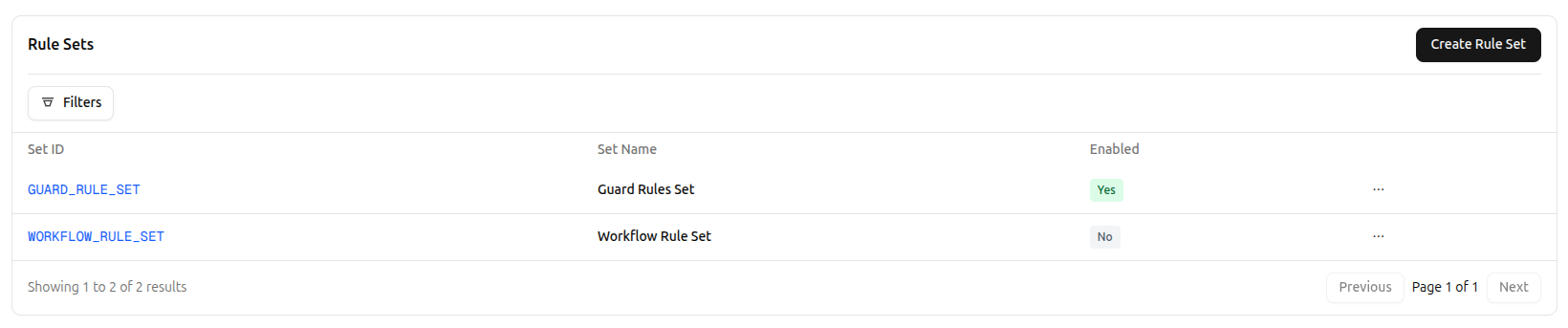 Rule sets list showing all defined sets with member count and enabled status
Set: QUALITY_CONTROL_RULES
Description: "Comprehensive quality checks for manufacturing"

Members:
  10 - Visual Inspection Required (GUARD)
  20 - Measurement Validation (VALIDATION)
  30 - Defect Score Calculation (CALCULATION)
  40 - Quality Status Assignment (ASSIGNMENT)
  50 - QA Team Notification (ACTION)
Set: ORDER_APPROVAL_WORKFLOW
Description: "Multi-level order approval process"

Members:
  10 - Check Approval Threshold (VALIDATION)
  20 - Calculate Approval Level (CALCULATION)
  30 - Set Approval Fields (ASSIGNMENT)
  40 - Notify First Approver (ACTION)
  50 - Log Approval Request (ACTION)
Set: MATERIAL_PLANNING
Description: "Material availability and procurement"

Members:
  10 - Block Without Materials (GUARD)
  20 - Check Lead Time (VALIDATION)
  30 - Calculate Shortage (CALCULATION)
  40 - Set Procurement Flag (ASSIGNMENT)
  50 - Notify Material Planner (ACTION)
Set: CUSTOMER_ONBOARDING
Description: "New customer setup and validation"

Members:
  10 - Validate Customer Data (VALIDATION)
  20 - Calculate Credit Limit (CALCULATION)
  30 - Set Default Values (ASSIGNMENT)
  40 - Create Welcome Package (ACTION)
  50 - Notify Account Manager (ACTION)
Keep Sets Focused: Each set should have a clear, single purpose. Don't create catch-all sets.
Use Descriptive Names: Set names should clearly indicate the business domain or workflow.
Document Dependencies: If rules depend on each other, document this in the set description.
Plan Sequences: Use increments of 10 to allow inserting rules later without renumbering.
Test Thoroughly: Test the entire set together to ensure rules work correctly in sequence.
Monitor Performance: Watch execution logs for the entire set to identify slow rules.
Version Control: When modifying a set, consider incrementing a version number in the description.
Start Small: Begin with a few rules, test thoroughly, then add more.
Start with basic rules, add advanced ones later:
Phase 1: Basic validation rules (enabled)
Phase 2: Calculation rules (enabled)
Phase 3: Advanced AI rules (disabled, testing)
Use sets to manage rules by environment:
Set: PRODUCTION_RULES (Enabled: true)
Set: STAGING_RULES (Enabled: false)
Set: DEV_RULES (Enabled: false)
Organize by business domain:
Sets:
  - Sales Rules
  - Finance Rules
  - Operations Rules
  - Compliance Rules
Set Not Executing:
Wrong Execution Order:
Rules Conflicting:
Performance Issues:
Manage rule sets programmatically:
# List all sets
curl -X GET "$BASE_URL/api/business_rules/sets" \
  -H "Authorization: Bearer $API_KEY"

# Get set with members
curl -X GET "$BASE_URL/api/business_rules/sets/{id}" \
  -H "Authorization: Bearer $API_KEY"

# Add rule to set
curl -X POST "$BASE_URL/api/business_rules/sets/{id}/members" \
  -H "Authorization: Bearer $API_KEY" \
  -H "Content-Type: application/json" \
  -d '{"ruleId": "rule-uuid", "sequence": 20, "enabled": true}'
See Sets API documentation for complete details.