 DocsTopicsSearch docsAPI referenceDocsTopicsSearch docsAPI reference
User guide
Set up key storage and choose which fields need encryption before enabling it. Check how search and existing records behave under the configuration you deploy.
Use tenant data encryption to protect sensitive columns with per-tenant DEKs, keep deterministic hashes for lookups, and let admins choose which fields stay encrypted.
Warning · Encryption maps are at-rest protection, not a read-side access control
Declaring a field in an encryption map controls how the value is stored, not who may read it.
It does not restrict who can see the plaintext through an authorised query path: any caller allowed
to read the record at all receives every mapped field in the clear, because decryption happens
automatically on load. Marking a GDPR-relevant column encrypted protects it against database
access, backups and dumps – it is not a substitute for an ACL feature on the route or page that
exposes the record.
To restrict who reads a field, gate the surface that returns it with an ACL feature
(requireFeatures in page metadata, or a feature check in the API route). To have a specific query
skip decryption entirely, see Declining decryption per query.
TENANT_DATA_ENCRYPTION – yes|no (default yes). Set to no to run unencrypted (hooks no-op, validation stays).TENANT_DATA_ENCRYPTION_DEBUG – yes to log map evaluation, Vault calls, cache hits, and fallback selection.VAULT_ADDR, VAULT_TOKEN – required for HashiCorp Vault KMS. Example: https://vault.example.com.VAULT_KV_PATH – KV v2 mount for tenant keys (default secret/data).TENANT_DATA_ENCRYPTION_FALLBACK_KEY (preferred) or legacy TENANT_DATA_ENCRYPTION_KEY. AUTH_SECRET and NEXTAUTH_SECRET are not used for data encryption. The built-in dev fallback is disabled unless ALLOW_DERIVED_KMS_FALLBACK=true; production without a dedicated fallback secret falls back to noop KMS.Note: changing encryption maps or toggling the Encrypted flag on a custom field only applies to data written after the change; previously stored values stay as they were unless you re-save or migrate them.
When using the vector module (vector search / embeddings), be aware that embeddings are stored unencrypted (for example, in Postgres pgvector the raw vector is stored in vector_search.embedding). Even though the source text is decrypted only transiently to compute the embedding and result metadata is encrypted by default, embeddings can still indirectly encode information about the underlying text.
In practice, reconstructing the original text from embeddings is difficult, but treat embeddings as sensitive data:
buildSource.secret/:
vault secrets enable -path=secret kv-v2VAULT_ADDR=https://vault.example.comVAULT_TOKEN=<token>VAULT_KV_PATH=secret/dataTENANT_DATA_ENCRYPTION=yessecret/data/tenant_key_<tenantId>.vault kv put secret/tenant_key_<tenantId> key=$(openssl rand -base64 32).encryption.ts file by exporting defaultEncryptionMaps:import type { ModuleEncryptionMap } from '@open-mercato/shared/modules/encryption'
export const defaultEncryptionMaps: ModuleEncryptionMap[] = [
{
entityId: 'customers:customer_address',
fields: [
{ field: 'postal_code' },
{ field: 'email', hashField: 'email_hash' }, // add hash when lookups must stay deterministic
],
},
]
entityId must be the entity's generated id (E.<module>.<entity> in entities.ids.generated.ts). The encryption subscriber derives that id from the entity class, so a map under any other id is never applied and its fields stay plaintext. When encryption is enabled, startup logs a warning for each map whose entityId names a module with entities but matches none of them, with the closest registered id.yarn mercato entities seed-encryption --tenant <tenantId> [--organization <orgId>]--organization, the command also appends missing field rules to the tenant's organization-level maps. Tenant setup creates a map per organization, and an organization map takes precedence over the tenant map, so those organizations would otherwise keep their old field list. Existing rules are never removed or changed.auth:setup, the app collects defaultEncryptionMaps from enabled modules and applies them automatically when encryption is enabled.defaultEncryptionMaps only reaches tenants created after the change. Nothing re-seeds existing tenants: not yarn db:migrate, not the start scripts. Without a backfill, every existing tenant keeps writing the new field as plaintext, silently.
When you add a map, or a field to an existing map, in a module that may already run somewhere, ship a migration in the same module that backfills it:
import { Migration } from '@mikro-orm/migrations'
import { buildEncryptionMapBackfillSql } from '@open-mercato/shared/lib/encryption/migration-backfill'

export class Migration20260929120000 extends Migration {
  override async up(): Promise<void> {
    this.addSql(buildEncryptionMapBackfillSql({
      entityId: 'customers:customer_address',
      fields: [{ field: 'postal_code' }],
    }))
  }

  override async down(): Promise<void> {}
}
The helper inserts the map for every existing tenant/organization that already has active encryption maps, and appends missing fields to maps that already exist. Tenants with encryption disabled are skipped. It is idempotent and leaves fields added by admins untouched. The entity id and fields are written literally, not imported from encryption.ts, so the migration keeps meaning the same thing later. Keep down() empty: deleting by entity_id would also remove maps seeded at tenant creation or edited in the UI, and switch encryption off for that entity.
yarn db:generate warns when the connected database has tenants missing a declared field and no migration backfills it. Set OM_ENCRYPTION_BACKFILL_CHECK=off to silence it.
Rows written before the backfill ran stay plaintext. Encrypt them with yarn mercato entities rotate-encryption-key --tenant <tenantId> (without --old-key it only encrypts plaintext values), or by re-saving the records.
Decryption is bound to the tenant the caller asserted, not to the tenant stored on the row: the
query engines refuse to decrypt a row whose tenant_id contradicts QueryOptions.tenantId, return
it as ciphertext, and log one aggregated warning naming the mismatching tenant ids. A scoping
mistake elsewhere therefore degrades to ciphertext instead of disclosing another tenant's plaintext.
The comparison needs a tenant on both sides. An ORM read through find*WithDecryption that passes
no scope has no caller tenant to bind against and keeps the pre-guard behaviour – pass { tenantId }
to get the binding. See
Decryption is bound to the caller's tenant
for the full set of limits.
A query that does not need plaintext at all can decline it outright with
QueryOptions.decryptEncryptedFields: false. The declined query performs no DEK lookup:
const res = await queryEngine.query('customers:customer_entity', {
  tenantId: auth.tenantId,
  fields: ['id', 'display_name'],
  decryptEncryptedFields: false, // display_name comes back as stored ciphertext
  page: { page: 1, pageSize: 50 },
})
The same switch is available declaratively on a CRUD list route:
makeCrudRoute({
  list: {
    entityId: E.customers.customer_entity,
    decryptEncryptedFields: false,
  },
})
It defaults to true – today's behaviour – so existing callers are unaffected, and it is an
opt-in to declining plaintext, not an access control.
Sorting on an encrypted field is unavailable on a declined query, because there is no plaintext to
sort by: the sort falls through to SQL ORDER BY over ciphertext, which produces a meaningless
order. The engines log one warning when a declined query sorts on an encrypted field – sort on a
plaintext column instead, or drop the flag for that query.
Open Configuration → Encryption. Pick an entity, toggle Encryption enabled for this entity, and choose which fields are encrypted plus optional hash columns.
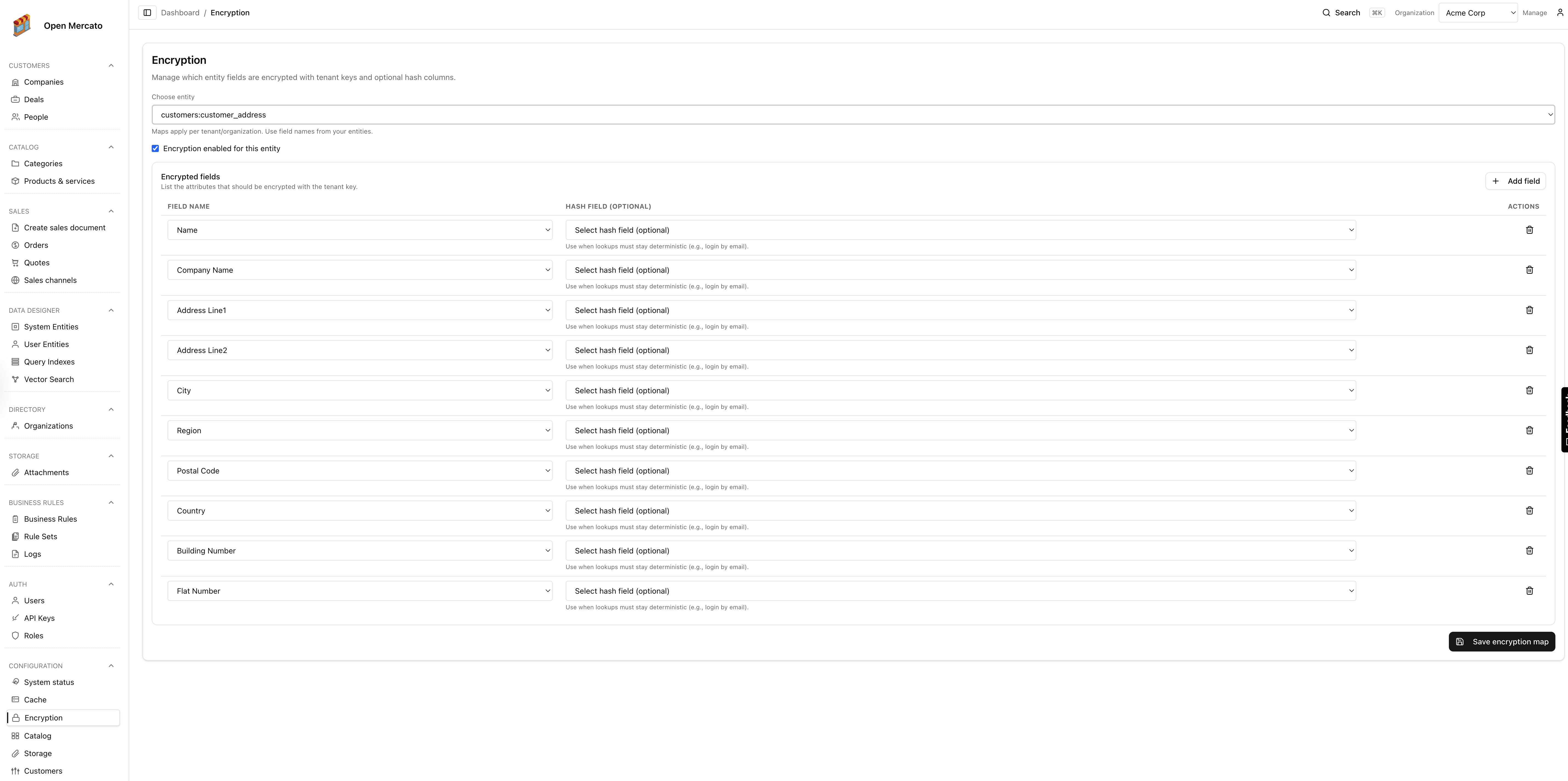
Notes:
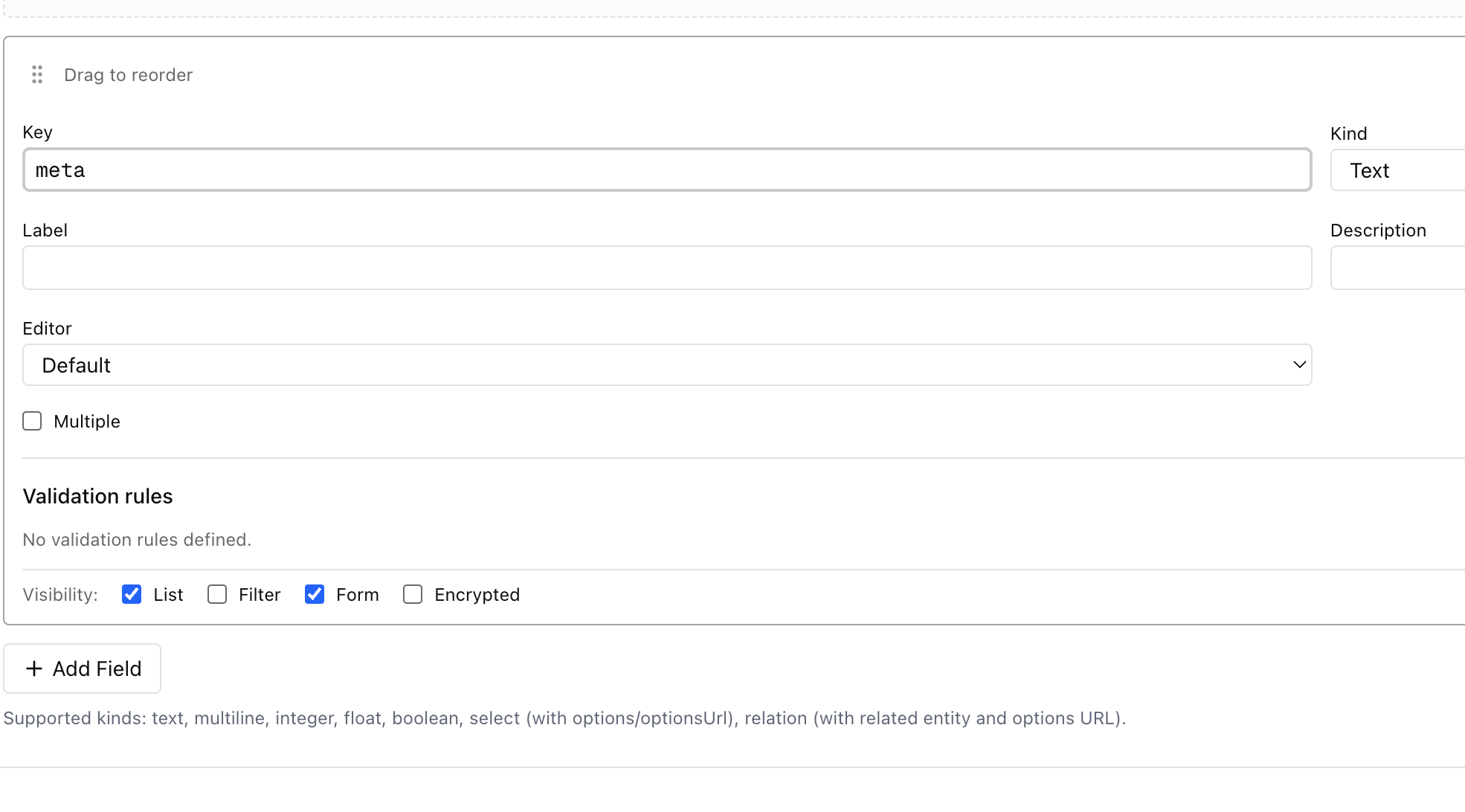
When defining a custom field, check Encrypted to store its values with the tenant DEK. Works for text, multiline, integer, float, boolean, select, and relation kinds.
Custom entity records also encrypt these fields inside custom_entities_storage.doc, with no need to enable EAV compatibility writes. Authorized record queries decrypt values using each record's tenant and organization; multi-value fields retain their array shape. If a protected document cannot be encrypted, its write fails before persistence.
Previously stored plaintext documents remain readable. Re-save them, or run the entities backfill below, to encrypt their protected values. Updating a document also encrypts protected legacy values retained by a partial update.
Use the CLI to encrypt plaintext rows or rotate a previous fallback key to the current KMS/fallback.
Auth users:
yarn mercato auth rotate-encryption-key
yarn mercato auth rotate-encryption-key --old-key <previous_fallback_key>
yarn mercato auth rotate-encryption-key --tenant <tenantId> --org <organizationId>
Entities with encryption maps and custom entity documents with encrypted fields:
# Encrypt existing plaintext rows:
yarn mercato entities rotate-encryption-key

# Rotate from a previous key after your secret manager injects TENANT_DATA_ENCRYPTION_OLD_KEY:
yarn mercato entities rotate-encryption-key --tenant <tenantId> --org <organizationId>
Notes:
--dry-run.TENANT_DATA_ENCRYPTION_OLD_KEY; do not put key material in command arguments. The deprecated --old-key form requires the explicit --allow-unsafe-old-key compatibility bridge and warns because shell history and process listings can expose it. No removal is scheduled.--dry-run never writes documents or provisions keys.--tenant (and --org when possible) during rotation to avoid accidental cross-tenant use.encryption_maps.id; resolve each one by re-enabling the module that owns the entity, or, once that entity's data is confirmed gone, by soft-deleting the row (UPDATE encryption_maps SET deleted_at = now() WHERE id = '…'). Maps that declare no encrypted fields, and tenantless (system-scoped) maps, are reported and skipped rather than treated as errors.TENANT_DATA_ENCRYPTION_FALLBACK_KEY set) before running these commands.Version. This procedure requires the post-v0.10.0 implementation of LOOKUP_HASH_OLD_PEPPER and entities rehash-lookups. On v0.10.0 keep the existing pepper. Upgrading all instances to a version with rotation support comes before changing it.
The lookup pepper keys the hashes used for exact matches such as sign-in by email. Its current value comes from LOOKUP_HASH_PEPPER, then TENANT_DATA_ENCRYPTION_FALLBACK_KEY, then TENANT_DATA_ENCRYPTION_KEY. LOOKUP_HASH_OLD_PEPPER adds a read candidate during rotation. New writes use the current pepper.
Deploy the version that supports LOOKUP_HASH_OLD_PEPPER while keeping the current pepper in use. Generate a new independent pepper and configure both values through your secret manager.
For a rolling cutover, first set LOOKUP_HASH_OLD_PEPPER to the new value while keeping the old value active for writes. Once all app and worker instances have picked up both candidates, pause writes that assign lookup hashes while switching LOOKUP_HASH_PEPPER to the new value and LOOKUP_HASH_OLD_PEPPER to the previous effective pepper. Resume those writes when all writers use the new pepper. This avoids concurrent creates inserting the same value under different hashes. If the previous hashes were unkeyed, leave LOOKUP_HASH_OLD_PEPPER unset after the cutover.
Once every writer is using the new pepper, preview and run the rehash for each tenant. Run the tenantless sweep as well to cover records such as pending onboarding requests.
yarn mercato entities rehash-lookups --tenant <tenantId> --dry-run
yarn mercato entities rehash-lookups --tenant <tenantId>
yarn mercato entities rehash-lookups --tenantless --dry-run
yarn mercato entities rehash-lookups --tenantless
Re-run the previews and check that they report zero rows to update. Verify email sign-in and remove LOOKUP_HASH_OLD_PEPPER from every instance.
The command uses the existing data-encryption keys to read encrypted sources and updates their existing hash columns in batches. It verifies each stored digest against a mapped source and the configured peppers, including legacy unkeyed digests. A preview reads the same rows without writing hashes or provisioning keys. If a source cannot be decrypted or verified, or a concurrent edit changes a row, resolve the error and re-run the same scope. Keep the previous pepper configured until every scope is complete. Coordinate any changes to encryption maps separately from the rehash.
Some records exist before any tenant does – a self-service onboarding request is created while the person filling the form still has no workspace. Those entities are encrypted under a system-scoped map (keyScope: 'system') declared in module code rather than under a per-tenant map in the database, so rotate-encryption-key never sees them: it walks the encryption_maps table and skips every row without a tenant.
Use backfill-system-encryption to encrypt rows of that kind that were written before the map existed:
# Preview only (no writes) — always start here
yarn mercato entities backfill-system-encryption --dry-run

# Encrypt every system-scoped entity
yarn mercato entities backfill-system-encryption

# Restrict the run to one entity
yarn mercato entities backfill-system-encryption --entity onboarding:onboarding_request

# Tune the page size for a large table (default 500)
yarn mercato entities backfill-system-encryption --batch-size 1000
Notes:
--old-key, so it cannot re-encrypt data under the wrong key.TENANT_DATA_ENCRYPTION is off or the KMS is unhealthy.--debug lists the affected row ids.Use decrypt-database to write all encrypted fields back to plaintext for a tenant. This is irreversible – take a full backup first.
# Preview only (no writes)
yarn mercato entities decrypt-database --tenant <tenantId> --confirm <tenantId> --dry-run

# Check encryption status and sampled payload estimate
yarn mercato entities decrypt-database --tenant <tenantId> --check

# Full decryption
yarn mercato entities decrypt-database --tenant <tenantId> --confirm <tenantId>

# Full decryption + deactivate encryption maps
yarn mercato entities decrypt-database --tenant <tenantId> --confirm <tenantId> --confirm-offline-maintenance <tenantId> --deactivate-maps
After a successful run:
TENANT_DATA_ENCRYPTION=false in your environment / secrets.yarn mercato query_index reindex --tenant <tenantId> to rebuild search indexes.--check again to confirm no encrypted values remain.The --confirm <tenantUuid> flag is a required safety gate – it must exactly match --tenant to prevent accidental cross-tenant runs. See the decrypt-database CLI reference for the full option list, error codes, and troubleshooting.
Malformed ciphertext makes the command exit non-zero. When --deactivate-maps is present, the maps remain active until every selected field decrypts successfully; investigate the reported rows and re-run before disabling encryption.
--check writes nothing, so it always completes its sweep: an entity whose tenant DEK is unreachable is reported and skipped rather than ending the inspection, and the command then exits non-zero to mark the check incomplete. Treat the printed counts as covering only the entities it could reach.
TENANT_DATA_ENCRYPTION_DEBUG=yes to see KMS cache hits/misses, Vault calls, and which fields were encrypted.VAULT_ADDR, VAULT_TOKEN, and VAULT_KV_PATH without exposing the token value.Custom field configured as encrypted was stored as plaintext at WARN level with the tenant, entity, and field key (never the value). It is emitted once per tenant/entity/field per outage – the throttle re-arms as soon as that tenant's key resolves again – so grep for it after any key-store outage and re-save the affected records once key access is restored.If you don’t want to depend on Vault, set a fallback secret and the runtime will derive tenant keys from it:
TENANT_DATA_ENCRYPTION=yesTENANT_DATA_ENCRYPTION_FALLBACK_KEY=<32+ char secret> (preferred) or TENANT_DATA_ENCRYPTION_KEY=<secret>When Vault is down or not configured, a warning banner appears and shows which env var supplied the derived key. Avoid short/shared secrets – treat this like any other encryption root and store it securely.
decrypt-database --deactivate-maps requires --confirm-offline-maintenance <tenantUuid> in addition to --confirm. Stop every application, worker and integration process that can write to this database before confirming. Restart every replica after the operation before resuming writes, so cached encryption policies cannot produce new ciphertext after retirement. The CLI cannot verify that external processes have stopped; the tenant confirmation is an explicit operator attestation, not an online-maintenance mode.
The command discovers fallback-map organization scopes from actual table rows, including organizations with no map row. An organization-only operation includes the tenant-wide fallback for reads but never retires that fallback. Retirement locks the policy and selected data tables, refreshes policies and performs a final ciphertext sweep in the same transaction before retiring exact map IDs. Locking may block other SQL writers; schedule a maintenance window. Row updates also compare the old column values and fail instead of overwriting a concurrent change. If a conflict or residual ciphertext is reported, retain the active policies and retry after stopping writers.
Previous: Manage dictionaries · Next: Manage feature toggles