User guide
Edit orders and quotes
Open the existing document and check its status before editing. The status and configured editing rules determine which fields and actions are available.
Sales settings determine when operators can change the customer or address.
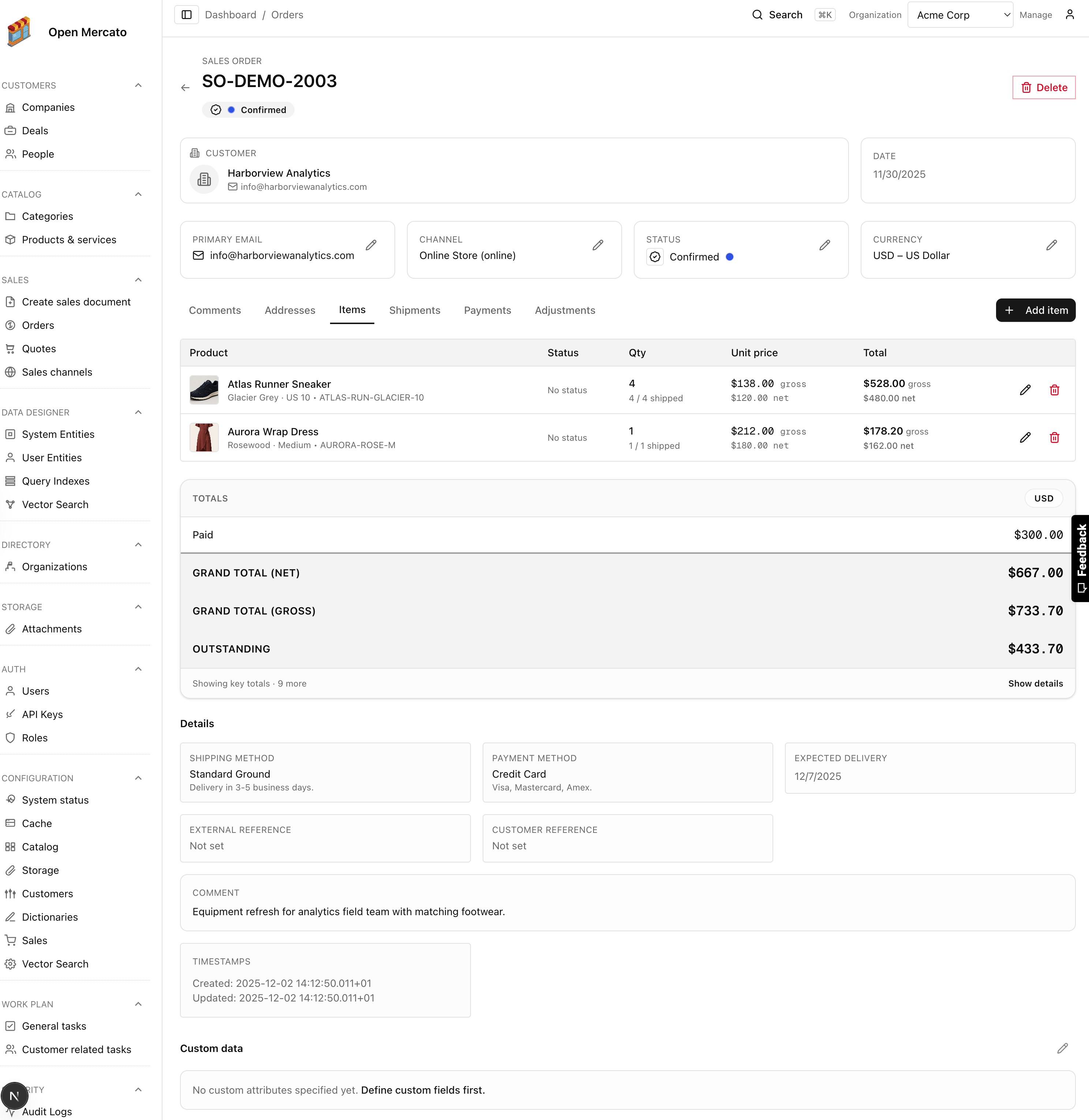
What you can edit
- Customer and primary email – swap the customer; addresses reset to prevent mixing data.
- Channel and currency – adjust if the sale moves to a different store or currency.
- Status – pick from your order or quote status dictionaries; guards may block changes at certain stages.
- Addresses – update shipping/billing, define new ones, or unlink “Same as shipping”.
- Items – add or edit lines from the Items tab; totals update immediately.
- Comments – keep an internal thread for handoffs.
Guardrails
- Editing guards (Sales settings) define whether customers/addresses can change at any status or only while Draft.
- Status transitions follow your configured dictionaries; some workflows restrict backwards moves.
- Recalculation – any change to items, adjustments, shipments, or payments updates totals automatically.
Keyboard and UX
- Dialogs follow shared shortcuts:
Cmd/Ctrl + Enter to save, Escape to close.
- Inline edits are feature-guarded by
sales.orders.manage / sales.quotes.manage.
 DocsTopicsSearch docsAPI reference