 DocsTopicsSearch docsAPI referenceDocsTopicsSearch docsAPI reference
Architecture
Follow a request from an admin page to its module, request-scoped services and database. These boundaries show where an application can change behavior.
Each enabled module declares the pieces it contributes. Applications can replace or override those pieces locally.
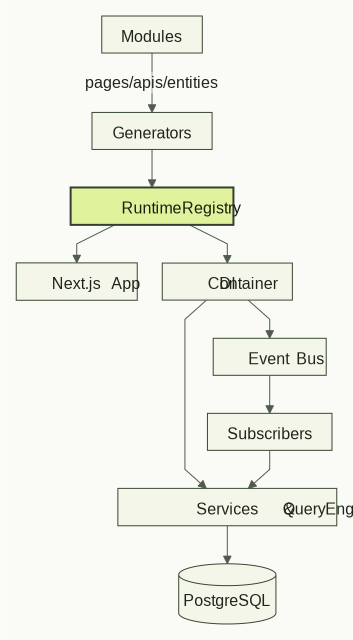
graph TD
  A[Modules] -- pages/apis/entities --> B[Generators]
  B --> C[Runtime Registry]
  C --> D[Next.js App]
  C --> E[DI Container]
  E --> F[Services & Query Engine]
  F --> G[(PostgreSQL)]
  E --> H[Event Bus]
  H --> I[Subscribers]
  I --> F

    classDef focus fill:#e0f29c,stroke:#34402d,color:#172011,stroke-width:2px
    class C focus
At build time, module generators collect every page, API handler, entity, subscriber, and feature definition into registries. During runtime, the Next.js App Router loads these registries to render pages, wire API routes, and boot the Awilix dependency-injection container. The container exposes services such as the query engine, data engine, RBAC checks, and event bus to both API handlers and subscribers.
Key principles:
apps/mercato/src/modules/<module>/... override their package counterparts, letting apps customize behaviour without forking the package.yarn generate regenerate registries so runtime always reflects the filesystem.packages/<pkg>/src/modules/<module> (package-supplied) or apps/mercato/src/modules/<module> (app overrides).apps/mercato/src/modules.ts. Removing an entry disables the module; adding a new entry enables a custom package.yarn generate) scan all enabled modules, merge overrides, and emit registries that drive routing, DI, entities, dashboards, and CLI discovery.| File / folder | Purpose |
|---|---|
index.ts | Module metadata (id, title, version, optional query-index configuration). |
acl.ts | Feature flags exported as features (used by RBAC). |
di.ts | Awilix registrar (register(container)) that installs services, repositories, and factories. |
backend/* & frontend/* | Next.js App Router pages. Optional *.meta.ts files supply navigation + RBAC metadata. |
api/<method>/<path>.ts | REST handlers, usually via the CRUD factory. |
data/entities.ts & data/extensions.ts | MikroORM entities and links to extend other modules. |
data/validators.ts | Zod schemas reused by APIs, CLIs, and forms. |
subscribers/*.ts | Event subscribers with metadata (event, persistent, optional sync for in-pipeline lifecycle). |
data/guards.ts | Mutation guards with priority ordering, payload modification, and afterSuccess callbacks (UMES M). |
commands/interceptors.ts | Command interceptors with beforeExecute/afterExecute hooks for execute and undo flows (UMES M). |
widgets/dashboard/* | Dashboard widgets auto-discovered by the admin UI. |
ce.ts | Custom entities & fields definitions for the Entities module. |
i18n/<locale>.json | Translation bundles for module-specific copy. |
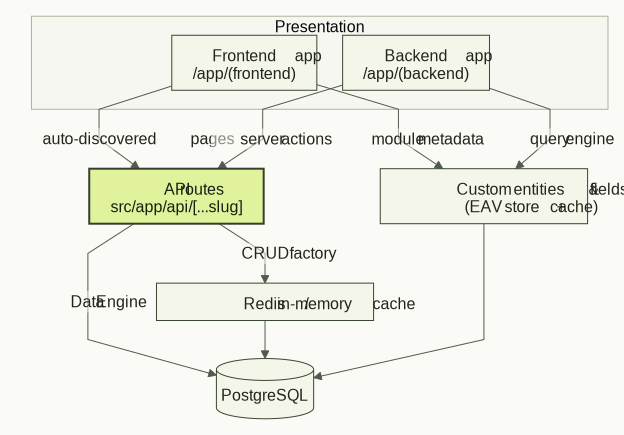
flowchart TD
    subgraph Presentation
        FE["Frontend app<br/>/app/(frontend)"]
        BE["Backend app<br/>/app/(backend)"]
    end
    API["API routes<br/>src/app/api/[...slug]"]
    CE["Custom entities & fields<br/>(EAV store + cache)"]
    CACHE["Redis / in-memory cache"]
    DB[(PostgreSQL)]

    FE -->|auto-discovered pages| API
    BE -->|server actions| API
    FE -->|module metadata| CE
    BE -->|query engine| CE
    API -->|CRUD factory| CACHE
    API -->|Data Engine| DB
    CACHE --> DB
    CE --> DB

    classDef focus fill:#e0f29c,stroke:#34402d,color:#172011,stroke-width:2px
    class API focus
src/app/(frontend) and src/app/(backend) resolve module pages. Backend pages attach metadata for navigation, RBAC, and features.src/app/api/[...slug]/route.ts, which loads module handlers and executes the request lifecycle (see request lifecycle).yarn mercato auth setup. The command ensures a tenant, its root organization, and bootstrap users exist, and can be rerun safely in any environment.tenantId and organizationId from the authenticated principal so queries, CRUD factories, and generated pages automatically filter to the active organization branch.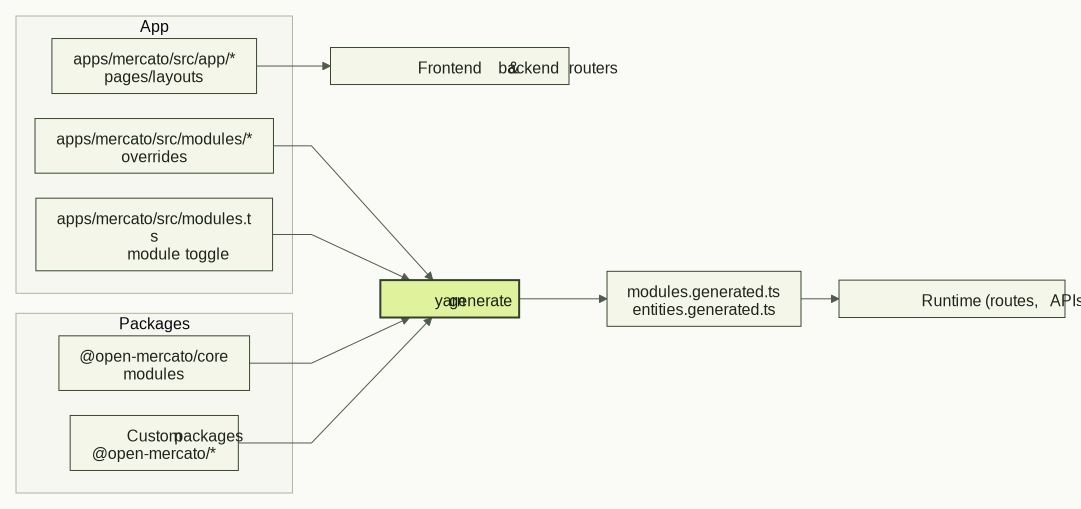
flowchart LR
    subgraph App
        SRC["apps/mercato/src/app/*<br/>pages/layouts"]
        SM["apps/mercato/src/modules/*<br/>overrides"]
        MT["apps/mercato/src/modules.ts<br/>module toggle"]
    end
    subgraph Packages
        CORE["@open-mercato/core<br/>modules"]
        EXTRA["Custom packages<br/>@open-mercato/*"]
    end
    SRC --> Router["Frontend & backend routers"]
    SM --> Generator["yarn generate"]
    CORE --> Generator
    EXTRA --> Generator
    MT --> Generator
    Generator --> Registry["modules.generated.ts<br/>entities.generated.ts"]
    Registry --> Runtime["Runtime (routes, APIs, DI)"]

    classDef focus fill:#e0f29c,stroke:#34402d,color:#172011,stroke-width:2px
    class Generator focus
apps/mercato/src/app – Override or add pages/layouts without touching package sources.apps/mercato/src/modules – Provide module-level overrides (backend/frontend pages, APIs, entities, i18n). Files here take precedence over package files with the same relative path.apps/mercato/src/modules.ts – Acts as a manifest: enabling/disabling modules reconfigures the application without code changes.apps/mercato/src/modules.ts, override routers in apps/mercato/src/app, or adjust DI via apps/mercato/src/lib.packages/<your-package> or override core behaviour in apps/mercato/src/modules/<module>.ce.ts or through the admin UI, then seed them with yarn mercato entities install.data/extensions.ts with defineLink() to relate module entities without violating module isolation.Every request (page load, API call, server action) runs through the same pipeline:
modules.generated.ts.createRequestContainer builds a request-scoped Awilix container, registers core services, then applies module di.ts registrars.requireAuth, requireRoles, and requireFeatures metadata are enforced before handler logic executes.See the dedicated request lifecycle reference for a deeper breakdown.
modules/<module>/i18n/<locale>.json. These files are merged at build time.@open-mercato/ui or @open-mercato/core/lib/i18n to load strings in pages, APIs, or services.src/modules, provide matching i18n files to keep language coverage consistent.This architecture lets you assemble enterprise features by combining modules, configure them per tenant or organisation, and override behaviour safely as your product evolves. Continue with the Framework reference to dive into the module APIs in detail.