 DocsTopicsSearch docsAPI referenceDocsTopicsSearch docsAPI reference
Introduction
Open Mercato is a framework for building business applications. It gives you a working back office, with modules for customer relationships, sales, inventory and other everyday operations. You choose the parts your business needs and write the rules that make the application yours.
Two companies can use the same words for a customer, a product and an order, yet disagree about who can approve a sale or when stock can leave a warehouse. Open Mercato supplies the records and operations they have in common. The decisions that differ from one business to the next belong in the application.
That gives a team a useful starting point. People can sign in, work in the right organization and use an admin interface while developers build the part that makes the business distinctive. An application can keep the standard back office, use the APIs behind its own interface, or offer both.
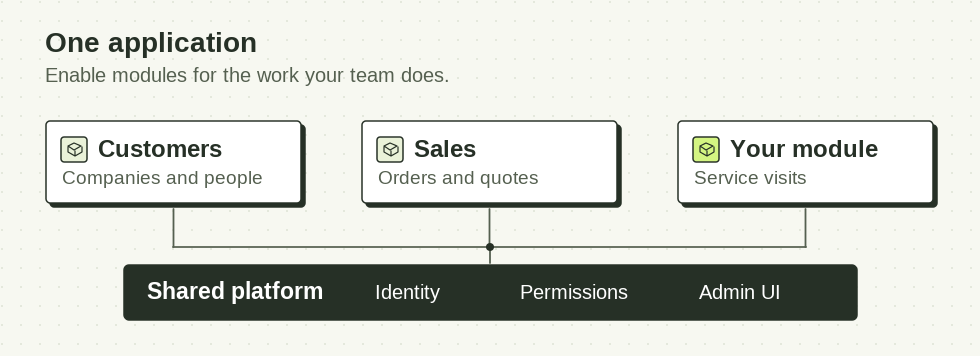
The framework provides the application shell and shared services such as sign-in, permissions and access to the database. Business modules add capabilities. Customers supplies companies, people and deals. Sales supplies quotes and orders. The modules you enable determine what appears in a particular app.
Your application is a TypeScript project. It selects the modules, extends their screens where needed and can register new modules of its own. Open Mercato runs on Next.js and PostgreSQL. Its core is MIT licensed. The separately licensed Enterprise package adds capabilities such as Agent Orchestrator. How modules are registered · Enterprise features
The next three chapters introduce the pieces you will meet throughout the reference. Start with how business data is stored, then learn what a module owns and how a change travels through the application. You can read them before installing anything.
When you are ready for a worked example, follow a sales order into a delivery review. To explore the product yourself, run your first app. If you already have a workspace, tour the back office or make your first API request.