 DocsTopicsSearch docsAPI referenceDocsTopicsSearch docsAPI reference
User guide
Find the transaction behind a payment, then open its details to inspect its status and gateway references. Keep the transaction identifier when following up on a specific attempt.
The Payment Transactions screen gives you a unified view of every transaction processed through the payment hub – regardless of provider. Navigate to External Systems → Payment Transactions.
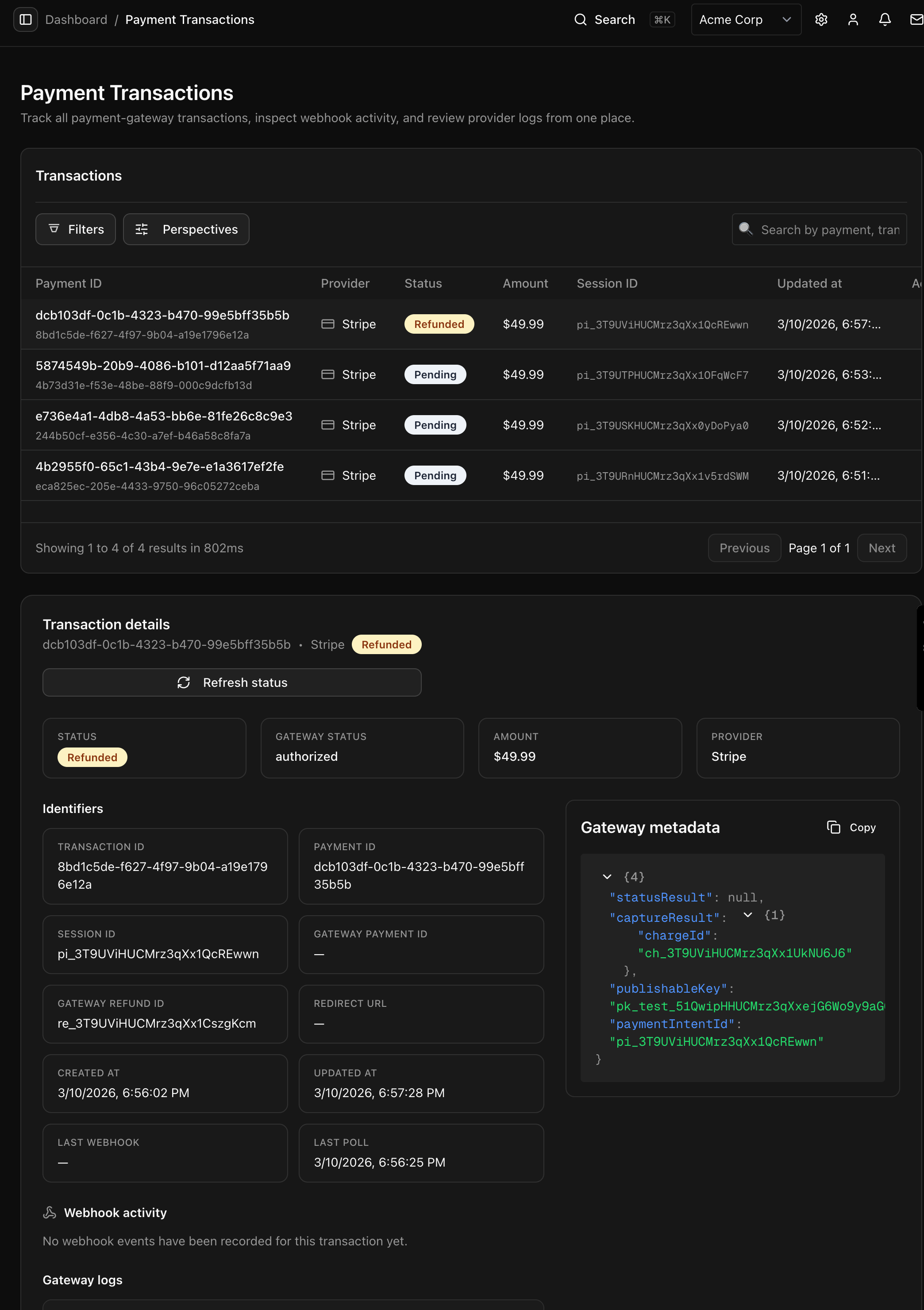
The top section shows all transactions in a searchable, filterable data table:
| Column | Description |
|---|---|
| Payment ID | The internal payment reference (UUID). The smaller ID below is the transaction ID. |
| Provider | Which gateway processed the transaction (e.g., Stripe, Mock). |
| Status | Current hub status: pending, authorized, captured, refunded, partially_refunded, cancelled, failed, expired. |
| Amount | The transaction amount in the original currency. |
| Session ID | The provider-side session identifier (e.g., Stripe Payment Intent ID pi_...). |
| Updated at | When the transaction was last modified. |
Use Filters and Perspectives to narrow results by status, provider, date range, or amount. The search box supports payment ID, transaction ID, and session ID lookups.
Click any row to expand the detail panel below the table. The detail view includes:
Refunded).authorized from Stripe before capture).re_...).Click Refresh status to query the payment provider for the latest state and update the local record. This is useful when webhooks are delayed or you want to force a sync.
The Gateway metadata panel shows the raw JSON returned by the provider. For Stripe this includes the Payment Intent ID, charge ID, publishable key, and any capture or refund results. Click Copy to grab the full payload.
The Webhook activity section lists every inbound webhook event received for this transaction, with timestamps and event types. This helps you verify that Stripe (or another provider) is delivering events correctly.
Below webhook activity, Gateway logs show the low-level request/response log for API calls made to the provider during this transaction's lifecycle.
authorized payments awaiting capture).Previous: Find your way around the back office · Next: Perspectives & sidebar customization