

Jules takes over a client on Monday. The draft agreement promises delivery within 48 hours. The question for the outgoing account owner is simple: “Why did we agree to that?” If the answer survives only in Mira’s inbox, transferring the client in a CRM has moved a name and left the work behind.
This is a small Next.js CRM you can run on your laptop. Attach the email that explains the delivery window, hand the client to Jules, then open the record as Jules and download the original. The sample company and email are fictional. The brief comes from Creativa Legal, whose lawyers wanted the next person handling a client to understand the decisions already made. Their CreativaOS client timeline brings correspondence, meetings and notes onto one record. Read the CreativaOS case study.
Run the handover
Download the Next.js starter, test and sample email. Unzip it, use Node.js 24.14 or later, and run the following commands in the extracted folder. We tested with Node.js 24.17. The standalone demo uses a local SQLite file, so you can try the whole handover before setting up Open Mercato.
cd nextjs-crm-handover
npm ci
npm test
npm run dev- Open
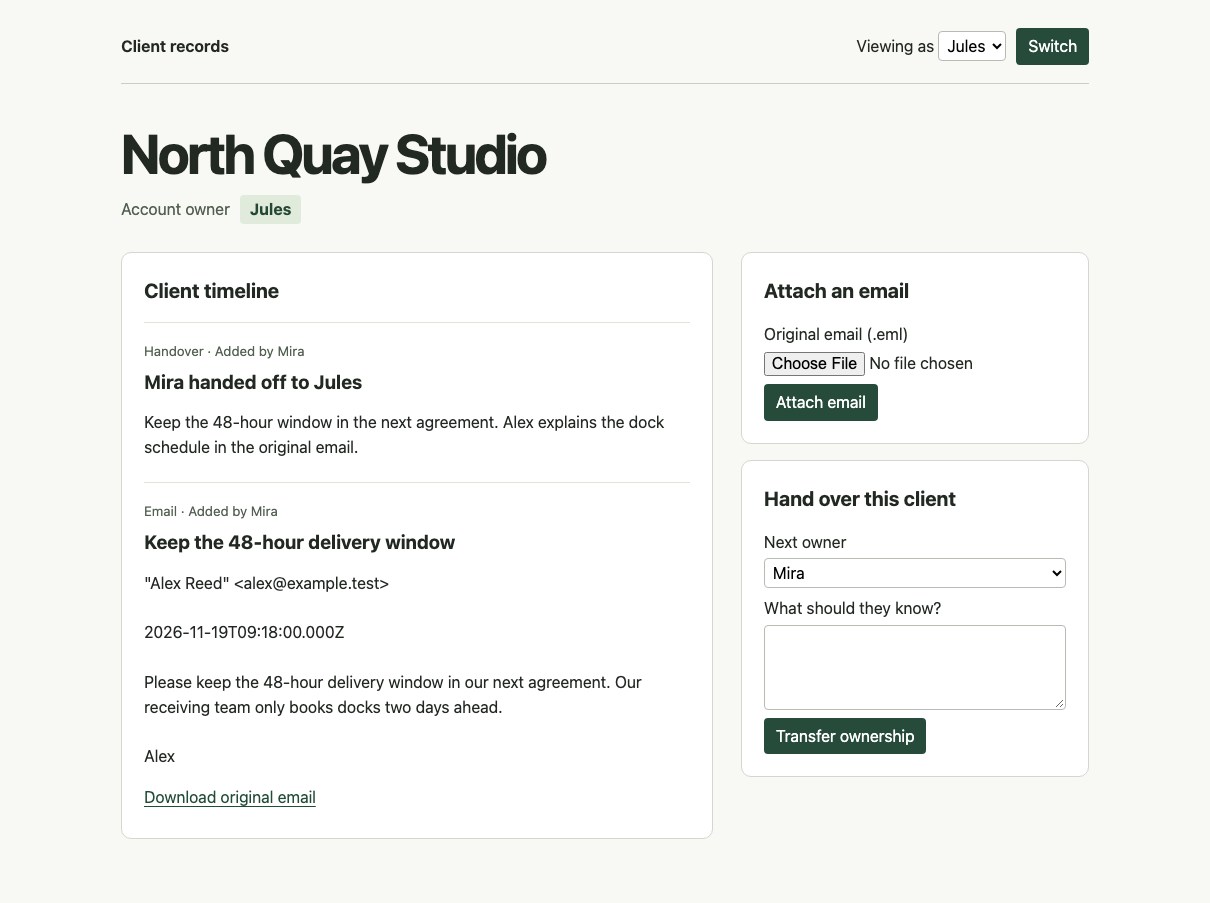
http://127.0.0.1:3000. You are viewing North Quay Studio as Mira. Under Attach an email, selectfixtures/delivery-window.emland click Attach email. Try the same file twice. The timeline should still show one message. - Under Hand over this client, choose Jules and enter a note: “Keep the 48-hour window. Alex explains the dock schedule in the original email.” Click Transfer ownership.
- Choose Jules in Viewing as and click Switch. Read Alex’s message. The receiving team books docks two days ahead. Click Download original email to recover the file Mira attached.
Give the email a home that survives a change of owner
The starter has two tables. A client has a stable ID and a current owner. Each timeline entry holds the client ID, the teammate who added it and the content. For email, it also holds the original bytes. The record can now answer three different questions: Who owns the client today? Who attached this message? Who actually wrote it?
In lib/store.js, attaching an email parses the sender, date, subject and plain-text body. A digest of the original bytes is unique per client, so an accidental second upload of the exact same file leaves one entry. Two different versions of a forwarded message can still have different bytes. If you ingest a live mailbox, choose how to identify repeat deliveries from that provider.
The owner change and its handover note commit in one SQLite transaction. The update also checks the current owner. If Mira submits an old form after ownership has already changed, that write fails and the transaction rolls back. Reading Jules’s timeline still begins with the client ID. The old emails never need to move.
UPDATE clients
SET owner = ?
WHERE id = ? AND owner = ?
npm test checks the duplicate upload, a stale handover, the incoming owner and the bytes returned for the original email. For a quick acceptance test with another person, give them just the client name. Ask why the delivery window exists and have them open the email that proves it.
Run the same handover on Open Mercato
The download includes integration/open-mercato.mjs. We ran it against a local Open Mercato 0.10.1 instance with two users in the same organization and the Customers and Attachments modules enabled. It creates a fresh test company and exercises the following operations.
POST /api/attachmentsuploads a multipart form. UseentityId=customers:customer_entityfor the record type, the company’s UUID asrecordIdand the original.emlasfile. Save the returneditem.id.POST /api/customers/activitiesrecords the timeline entry. HereentityIdmeans the company’s UUID. SetactivityTypetoemailand supply the subject, body, sent time and teammate who added it.PUT /api/customers/companiestakes the company ID and its newownerUserId. Read the company back, list/api/customers/activities?entityId=<company-id>and download/api/attachments/file/<attachment-id>. Our test found the original activity and recovered a byte-for-byte match after the owner changed.
To run this part yourself, follow the README to select a disposable local instance, an organization-scoped credential and two test-user IDs. The script uses one authorized API caller. A production handover also needs a test signed in as the incoming teammate, with that person’s actual record permissions. Keep credentials on the server and use synthetic mail in this starter. Explore the Customers API and the Attachments API.
Once the handover works, pick a real decision your team struggles to explain six months later. That is the next thing worth putting on your client timeline.