
To do
- Draft the proposal
- Book a discovery call
In progress
- Prepare the demo
Done
- Confirm the project brief
Get your own board in Open Mercato
Start a free 7-day sandbox to work with Open Mercato’s sales pipeline.
Inside Open Mercato’s sales Kanban board
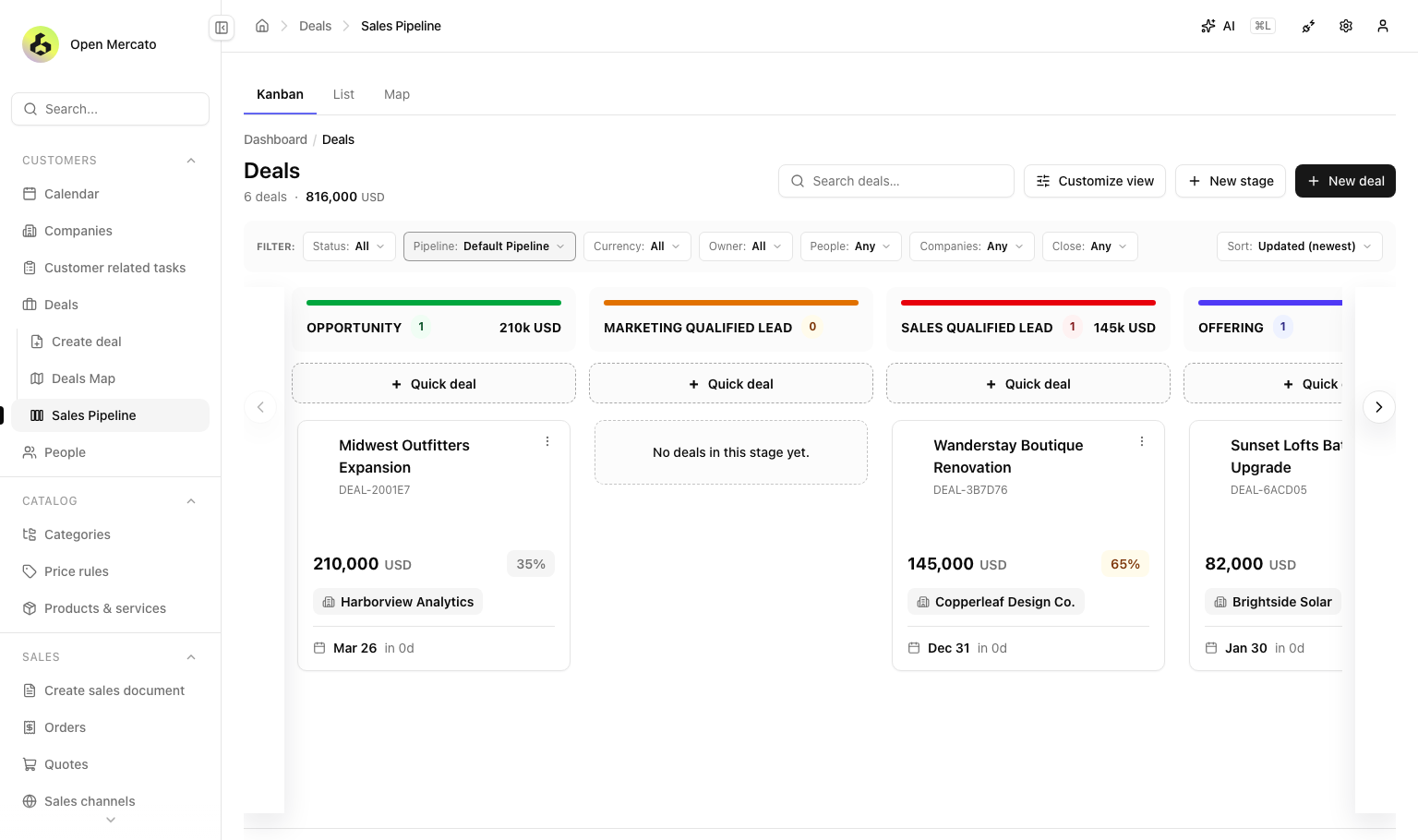
The board above uses the column layout and inline card entry from Open Mercato’s Task Board. In the CRM, each column is a stage in a sales pipeline and each card is a deal. Moving the card updates the deal record for the team. Here is the sales board in version 0.10.1, running with fictional demo data.
Open the full-size screenshot.
What you can read from a card
Look at Midwest Outfitters Expansion in the Opportunity column. The card shows a value of $210,000, a probability of 35%, and a linked company. The lane header shows one deal and $210k. That number is the face value of the deal. Multiplying by the displayed probability would give $73,500, which is a different forecast.
The next lane, Marketing Qualified Lead, is empty. Sales Qualified Lead contains the $145,000 Wanderstay deal. A manager can see the gap and open the underlying cards before deciding whether the team has a sourcing problem or simply uses these stages differently.
How to use the board in Open Mercato
- In the back office, open Customers → Deals → Sales Pipeline and select Kanban. The screenshot uses the Default Pipeline. If your installation has several, select the one you want to review.
- Use Quick deal in a lane to start a card there, or choose New deal. Pick a title other people will recognize and link the customer so the next owner can find the relationship.
- Drag a card when the buyer has actually reached the next stage. Open the deal to record the call, decision, or next commitment that justifies the move.
- Filter by owner, company, or close date for a focused review. Switch to List when you need to compare several records as rows.
When this board is a good fit
Use it when the item moving across columns is a sales opportunity and the team needs its customer, value, and activity history. A delivery team that wants sprint planning, issue dependencies, or software release tracking should evaluate those requirements separately. This screenshot shows the CRM sales pipeline.
The Open Mercato core is MIT-licensed. You can inspect the implementation and run the starter locally. Browse the source, run your first Open Mercato app, or read the deals workspace guide.