The machine looks right. Can it actually be quoted?
A heavier frame. Bigger tyres. More lift height. The largest attachment. On screen, each choice looks like one more option. Together, they can change whether a machine is a sensible configuration to put in front of a customer.
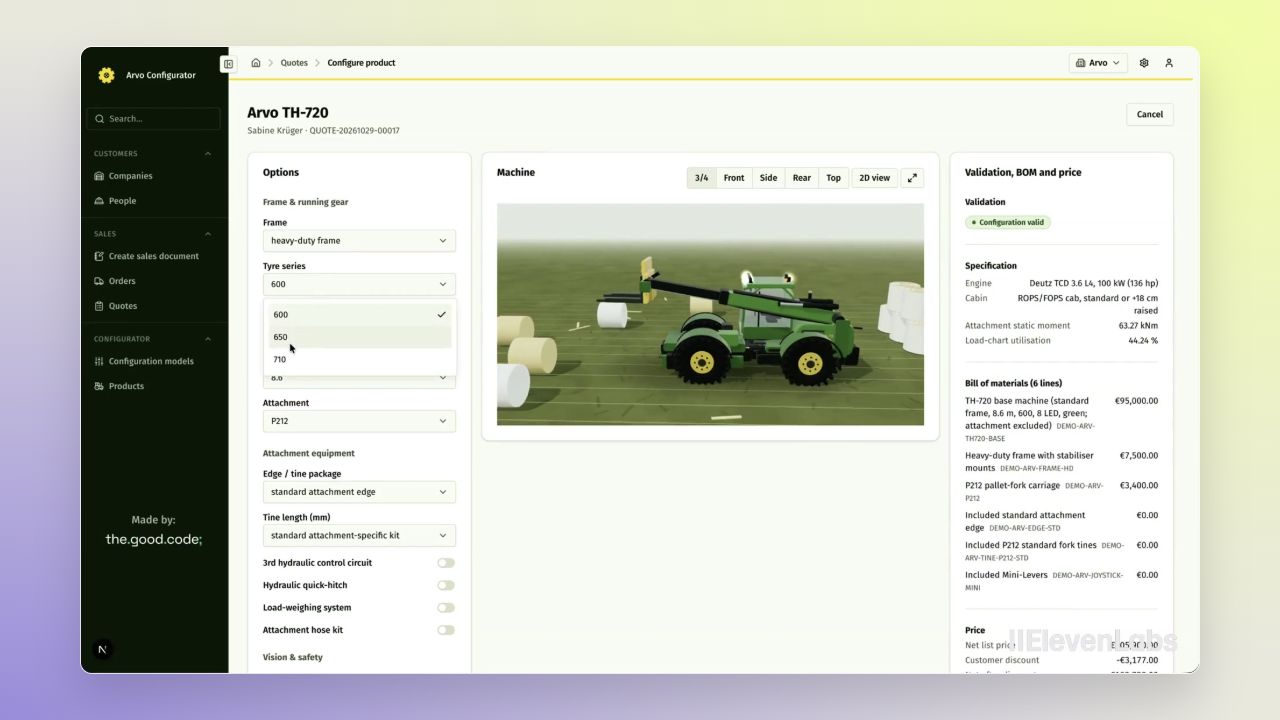
In the Arvo Configurator walkthrough, that tension becomes visible. The salesperson selects the largest attachment and the system pushes back: the calculated load exceeds an engineering review threshold. The combination needs manufacturer confirmation. Switching to a mid-size attachment clears the warning, and the matching tine length is selected automatically.
That is the heart of this project. The Good Code connected product configuration to the sales process in Open Mercato, so the model, its rules, the parts and the price move together. Arvo Configurator demonstrates the team's Open Mercato Configuration & Quoting module through an Arvo TH-720 telescopic handler.
This case study follows a working demonstration developed from the team's hackathon project. It describes the workflow shown in the video, rather than a production customer deployment.
Start with the customer, then build the machine
The workflow begins in the sales quotes list. A salesperson creates a new sales document, selects quote as its type and searches the customer list. Selecting the customer fills in their email automatically. The resulting quote already contains the customer's details.
From there, the Configure product tab opens the next stage. There are no configured products on the quote yet, so the salesperson adds one and launches the configurator. Configuration starts inside an existing customer and sales context.
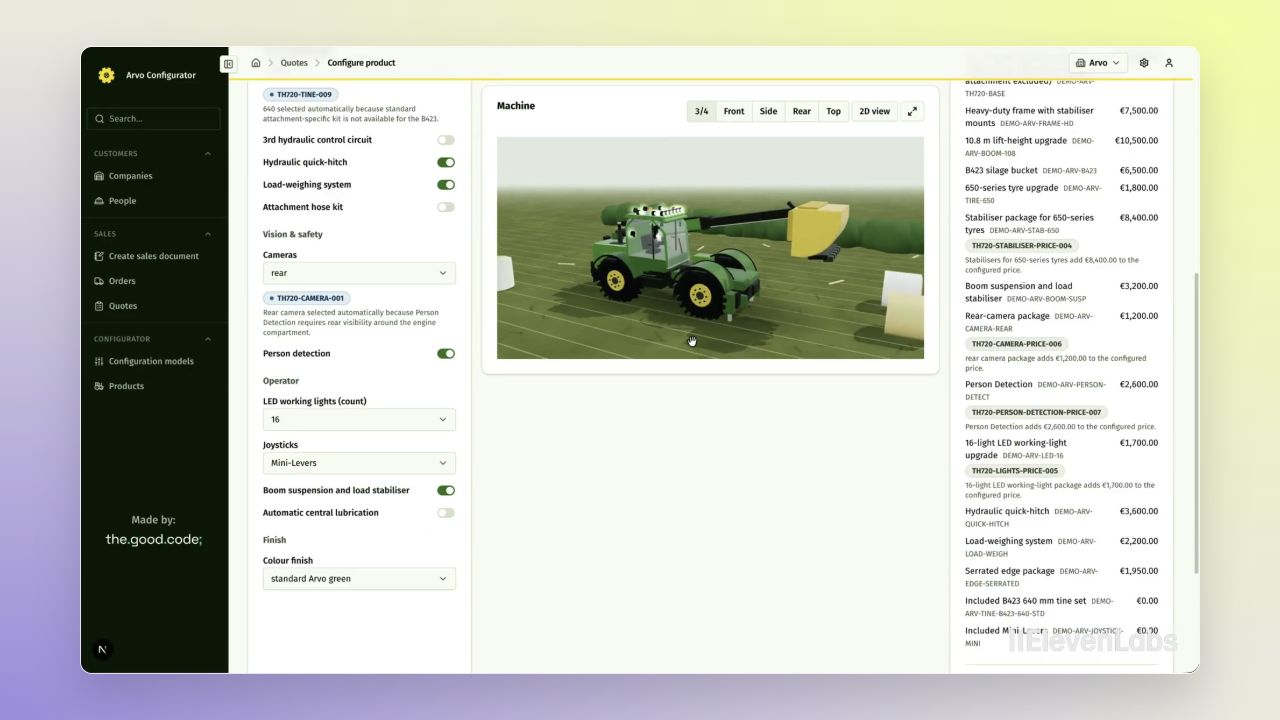
The initial machine is already evaluated against a standard starting configuration. Options sit on the left, the interactive three-dimensional model occupies the centre, and validation, specification, bill of materials and price appear on the right. The salesperson can rotate the machine while making choices and immediately see the consequences.
Make the rules part of the conversation
As the configuration develops, the salesperson changes the frame, tyres, hydraulic stabilisers and lift height. The attachment warning brings the engineering constraint into the same workspace where the commercial decision is being made.
The system also handles dependencies. When person detection is enabled, it automatically adds the required rear camera and explains the reason: the feature needs visibility around the back of the machine. The salesperson sees both the change and its justification.
Choosing a compatible attachment sets its matching tine length. Adding a serrated edge or extra hydraulics updates the bill of materials and price alongside the model. These are business rules with visible consequences: a selection can change another option, add a component or require further review.
One configuration, several views of the same decision
A product configurator has to do more than draw an attractive machine. The customer needs to understand what they are buying. The salesperson needs to know what it costs. The component list needs to reflect the choices that produced that price.
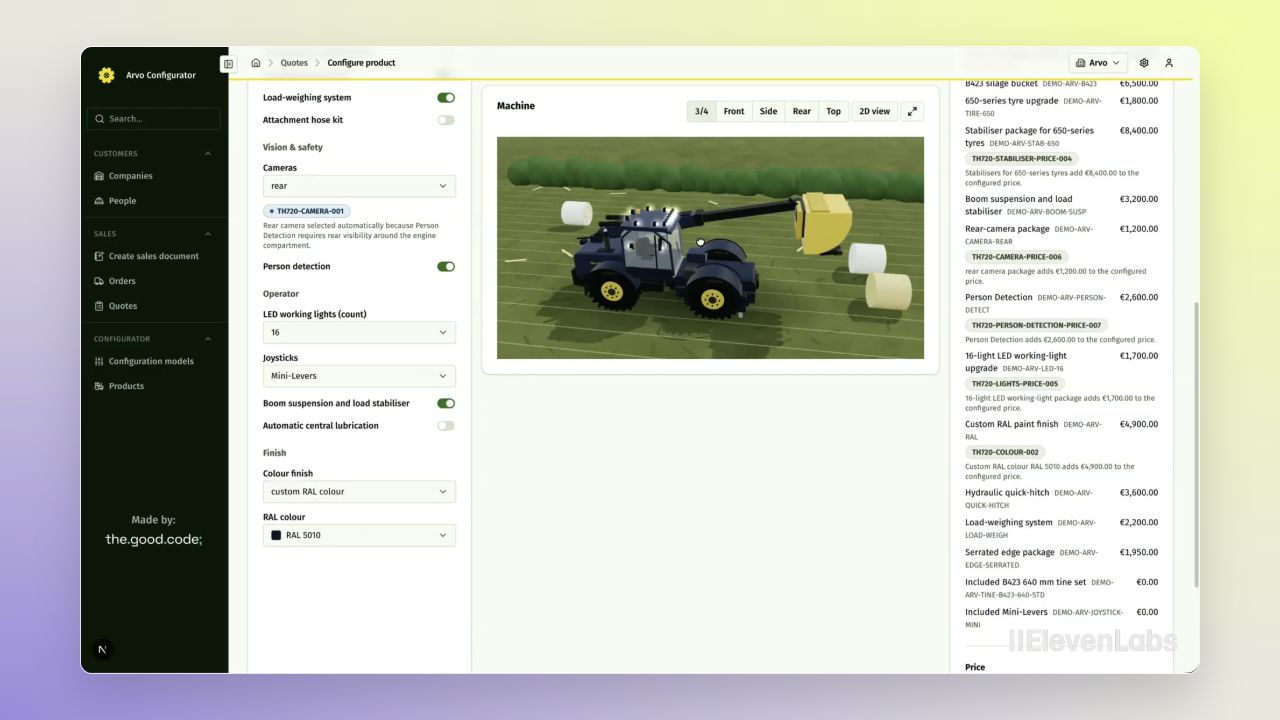
The walkthrough keeps those views together. Working lights are raised to their brightest setting, boom suspension is enabled, and the finish changes from standard green to a custom RAL blue. The model updates immediately while the specification, bill of materials and price remain in sync.
By the time the salesperson reviews the final price, the configured machine already has its selected options and calculated details attached. There is no separate step in this demonstrated flow where someone has to reconstruct the machine from a visual preview.
Freeze what was selected. Share that exact machine.
Adding the machine to the quote creates a configuration snapshot: an immutable record of the selections, specification, validation result and bill of materials. The quote now points to a specific configuration, preserving what the salesperson actually added.
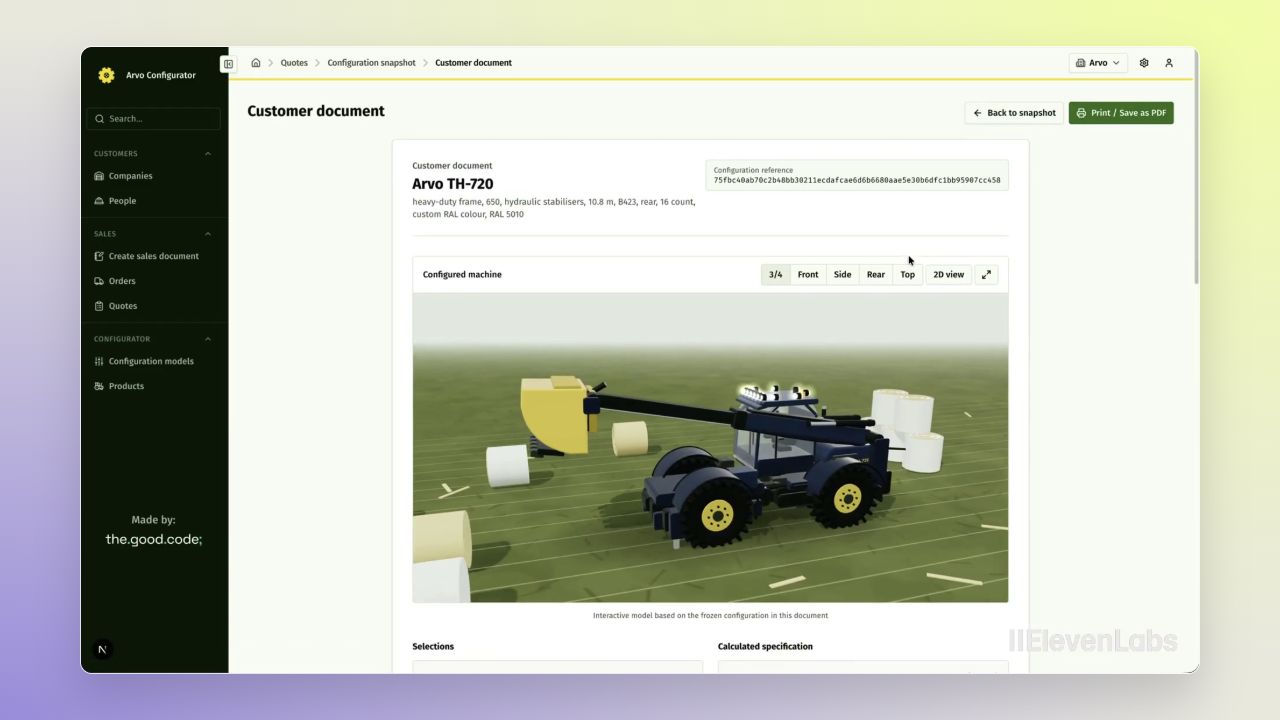
The salesperson then generates a sharing link that the customer can open without creating an account or logging in. It is a direct handoff of the configured machine.
The customer document provides a read-only view of the same configuration. The model remains interactive, so the machine can be rotated and inspected. Below it, the customer can review the selected options, calculated specification and full priced bill of materials. A print or save-as-PDF action makes the document usable outside the application too.
Build the specialised layer on an existing foundation
The Good Code built the machine-specific configuration logic on Open Mercato's customer records and sales workflow. According to the team's project description, the platform supplied the back office, authentication, multi-tenancy, catalogue, quotes and orders. Their custom work covered the configuration model, rules, pricing, specification, bill of materials and visualisation.
That division of work is the value of starting with a business application foundation. The team could concentrate on questions specific to a configurable machine: which options belong together, when a combination needs review, how a selection changes the parts and price, and what must be preserved when it becomes a quote.
From a product choice to a customer-ready document
The result is a connected demonstration of a complete sales journey: select the customer, configure the machine, evaluate the choices, add the result to a quote and share the exact configuration with the customer.
The most revealing moment is still the one where the configurator pushes back. It makes a constraint visible before the salesperson finishes the quote. From there, each correction carries through to the model, specification, parts and price, and finally into the document the customer receives.
Built and demonstrated by The Good Code. Watch the full walkthrough above, or explore the team's project description.
Images are actual frames extracted from the supplied video, presented on Open Mercato's gradient background. The machine, pricing and configuration data shown belong to the demonstration.
- Open Mercato customer records and sales workflow
- Custom configuration and validation rules
- Interactive 3D product visualisation
- Calculated specification, bill of materials and pricing
- Immutable configuration snapshots and customer documents