PLN 74,400 in revenue. How much did the team keep?
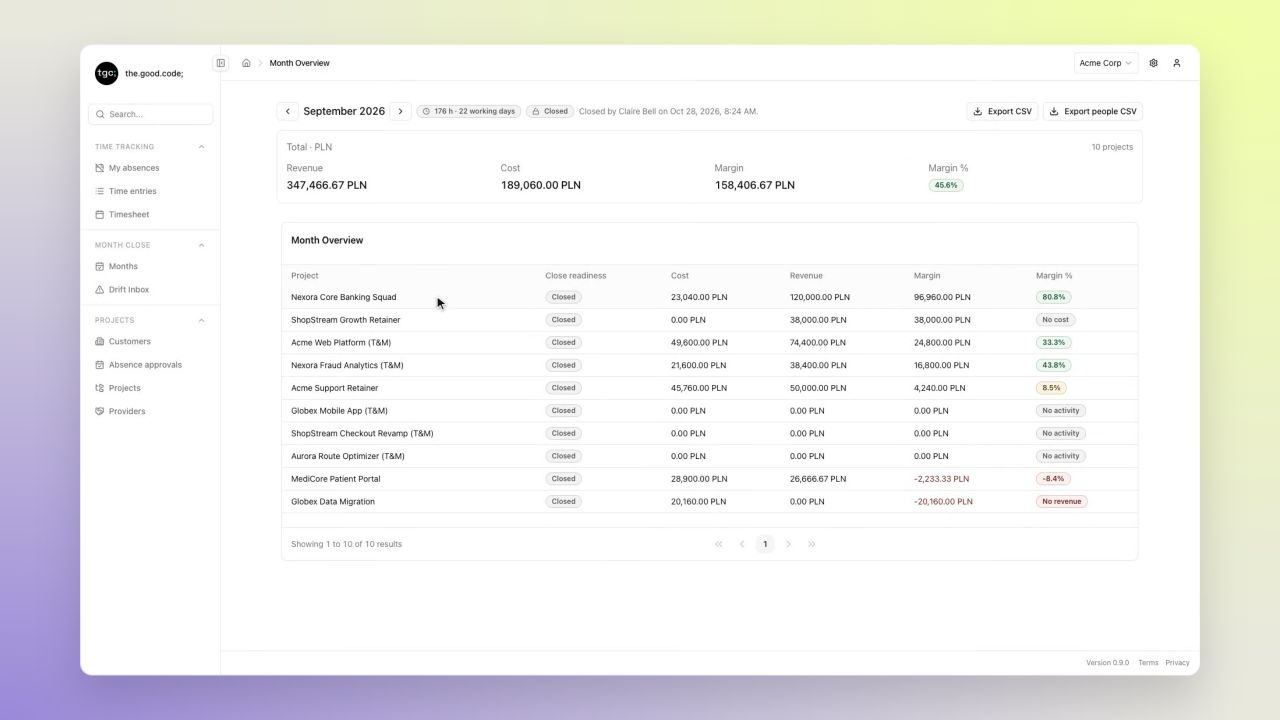
In the demo, Acme Web Platform brought in PLN 74,400. Delivering the work cost PLN 49,600. That left PLN 24,800 on the project, a 33.3% margin. For the owner of a services business, the next question is where those numbers came from.
In the workflow described by thegoodcode, answering that question meant bringing together hours from one place, rates from another and a margin spreadsheet rebuilt every month. Closing became a cycle of chasing approvals and copying figures. A number could finally appear without everyone being confident about how it had been assembled.
thegoodcode built a back office on Open Mercato around that entire process. Customers, people, project assignments, rates, time entries and approvals feed into project margin and month close. Each stage supplies the context the next one needs.
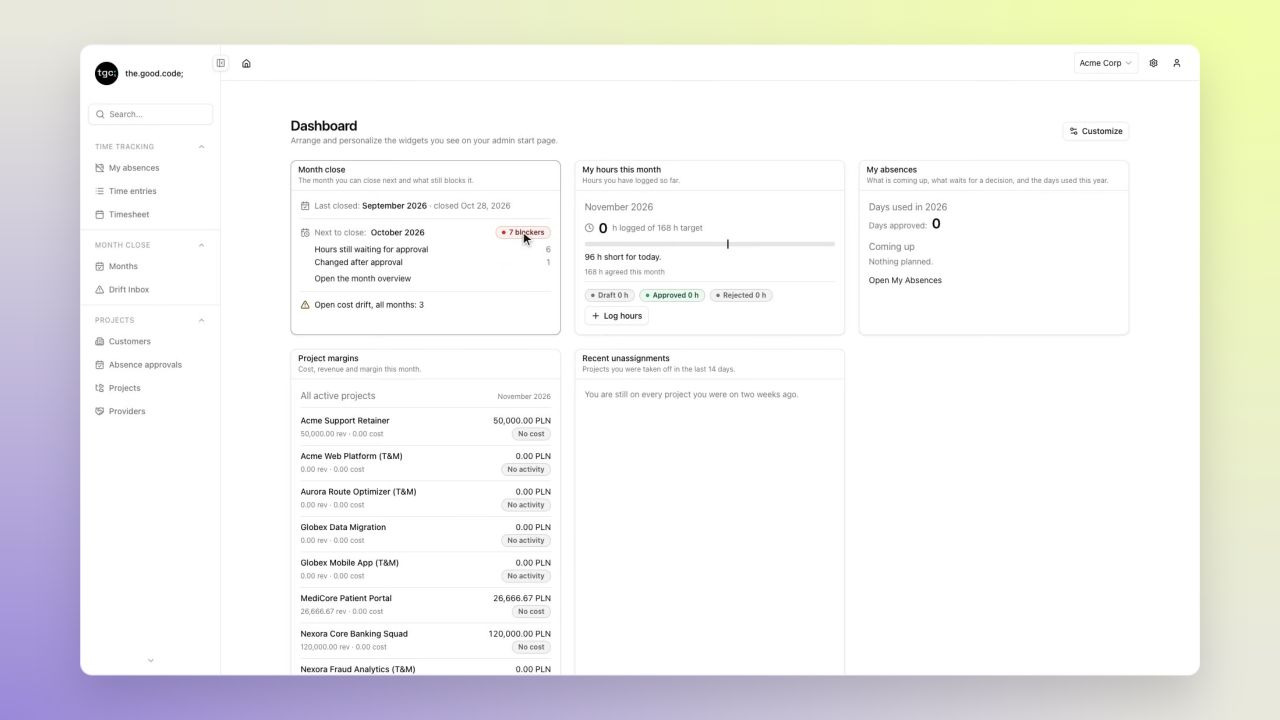
In the walkthrough, October has seven blockers. Some hours still need approval; another figure has changed after approval. Those exceptions are visible before the month can close. They give finance a concrete list of things to resolve.
This case follows the demonstration of the back office thegoodcode built for its software services business. All people, projects and financial figures shown in the video are demo data. No client data appears in the recording.
What does an hour cost on this project?
The process starts before anyone opens a timesheet. An administrator creates a customer and sets a default currency, which the customer's projects inherit. The customer notes field is stored encrypted.
Providers are the people who log time. Their records bring together contract type, agreed hours per day, current hourly cost rate and engagement dates. Missing rates are flagged in the list. Agreed daily hours establish a monthly target, while days above the agreed amount are flagged for a project manager to review.
A project then connects that work to a revenue model. The back office supports time and material, a monthly fixed budget and a fixed total budget. The walkthrough follows a time-and-material project, where approved hours and the applicable rates determine its cost and billed revenue.
New projects start empty. A manager must be assigned, the team must be added and the rates must be set. Making those steps explicit matters: an hour with no cost rate cannot tell the business what the work really cost.
March rates stay out of February’s figures
Finance assigns people to the project and sets an internal and an external rate for each person. The internal rate represents the cost of their work. The external rate represents what the customer is billed. Alice and Sam each receive their own pair.
Each rate has a valid-from date. Changing a rate in March therefore does not overwrite the rate that applied in February. Project-manager assignments carry dates too, allowing responsibility to pass from one manager to the next through a defined handover.
These dates preserve the context behind the calculation. The back office can distinguish who was responsible for the project and which rate applied to the work, instead of treating today's setup as the answer for every month.
The demonstration also makes a dependency explicit: until a rate is set, the person contributes no cost on the project. The missing-rate flag is therefore an important setup signal. A low recorded cost is only meaningful when the underlying rates are in place.
Six billable hours on Alice’s timesheet
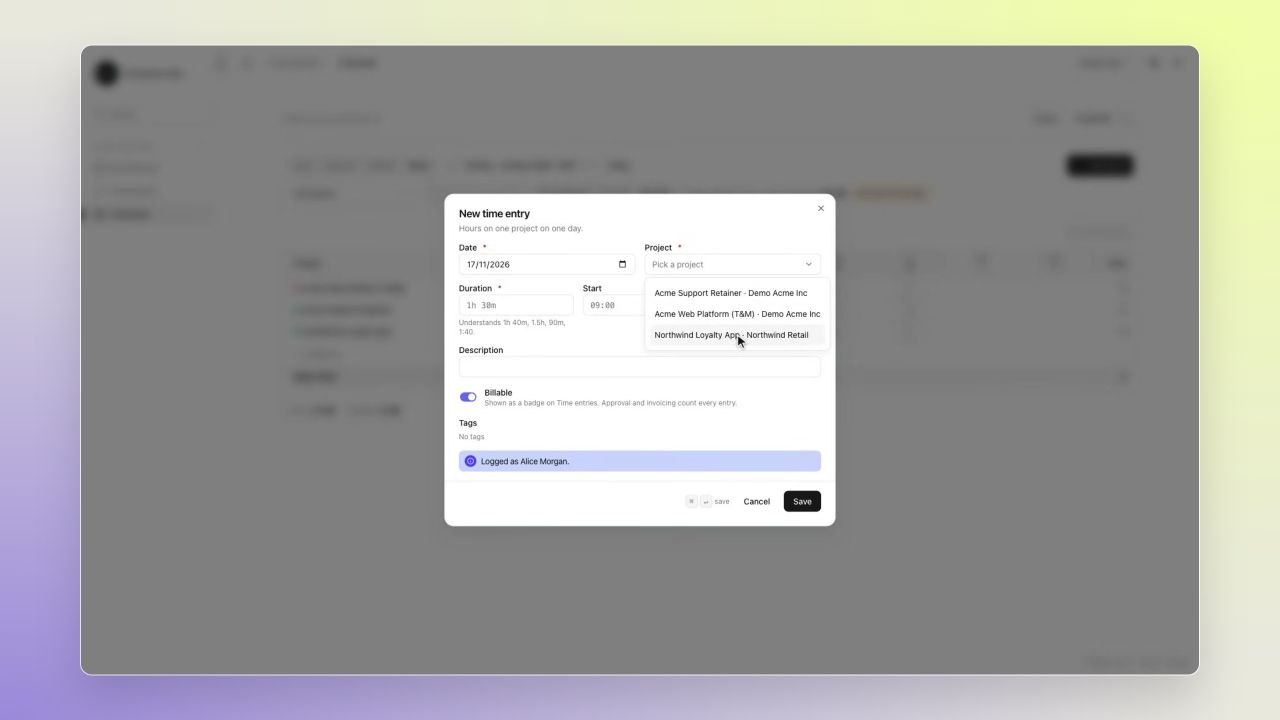
Alice opens her weekly timesheet and creates an entry. The new project is already available because finance has assigned her to it. She enters six hours, adds a note and leaves the entry billable.
The timesheet gives the person doing the work a familiar way to record it. The business rules connect that entry to the assigned project, agreed hour targets and billable status used by the approval and invoicing process.
Open Mercato supplies the timesheet foundation, including its grid, calendar and timer. thegoodcode added the project-specific rules and the economics of its services business on top.
Ben’s sign-off locks in the cost
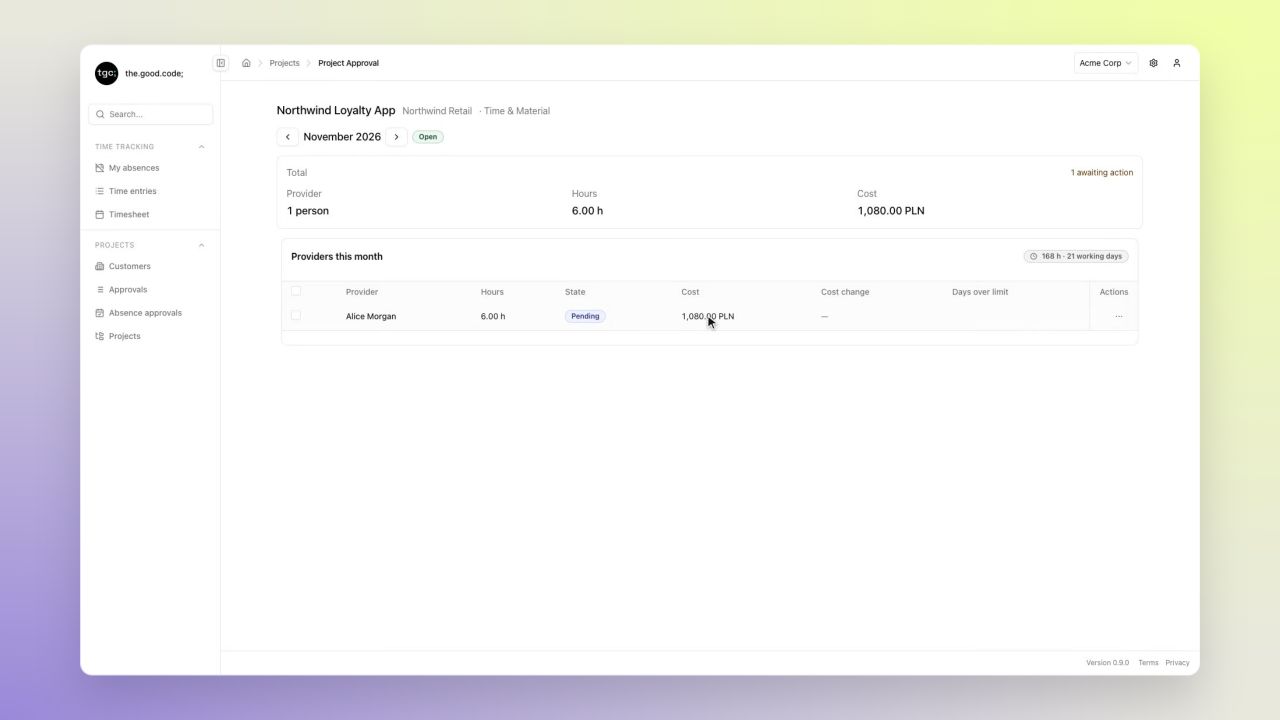
Ben, the project manager, sees the newly logged hours on his dashboard. His approval list contains the projects he manages, keeping his review focused on the work he is responsible for.
He opens the project and moves to November, where Alice's six hours are waiting. They are already priced at their internal cost. When he approves them, that cost is fixed at the point of approval, together with his name and the time of the decision.
This makes approval a meaningful boundary in the workflow. It establishes the cost that was signed off and records who made the decision. If the underlying figures move later, the application has an approved state to compare them against.
Open Mercato's roles and permissions govern who can see and perform actions. The approval and costing rules are the custom layer built by thegoodcode.
What changed after sign-off?
For finance, an approval is not the end of every exception. A figure can change after it has been signed off. The back office treats that as drift and gives it a dedicated inbox.
The month-close dashboard distinguishes two kinds of blockers: hours still awaiting approval and figures that changed after approval. Finance can see what remains unresolved before closing, rather than discovering the discrepancy while rebuilding the month's spreadsheet.
November is still live in the walkthrough. The new project's margin can be opened to reveal the calculation behind it: Alice's approved hours at the internal rate, those hours billed at the external rate, and whether any entries remain in draft.
That breakdown makes the margin inspectable. The viewer can follow it back to work, rates and approval status, rather than relying on a total without its supporting context.
Two projects finished September in the red
Once a month is closed, its figures are frozen. The record identifies who closed it and when, and the data is ready to export.
The September view in the demo shows both profitable and loss-making projects. Two projects have negative margin. Keeping those results visible is part of the point: the back office should expose the economics of the work, including the projects that need attention.
The closed view preserves the reviewed figures while the next month continues through logging and approvals. Finance has a stable record of the period it closed, with CSV exports available from the same screen.
What thegoodcode built on Open Mercato
The application brings several platform capabilities into one specialised module. Open Mercato supplies forms, lists, data tables, dashboards, roles and permissions, timesheet components and field-level encryption. thegoodcode models its customers, projects, rates and assignments around the way a software services company operates.
The custom work connects those pieces: agreed hour targets, billable status, dated rates, approval-time costing, margin calculations, drift detection and the rules for closing a month.
That is the practical value of the foundation. The team can put its effort into deciding what an approved hour means for cost, what happens when a figure changes and what has to be true before finance closes a period.
A margin you can trace back to the work
The walkthrough follows one continuous path: set up the customer and team, establish rates, log six hours, approve their cost, inspect the margin and review a closed month.
The result is a back office organised around the decisions a services company needs to make. People log the work. Managers approve it. Finance sees the exceptions and closes the period with a preserved record. The financial total has a visible path back to the work that produced it.
Built by thegoodcode on Open Mercato. Watch the full demonstration above to follow the process from a logged hour to a closed month.
Screenshots come from the walkthrough. The cover shows revenue, delivery cost and project margin for Acme Web Platform in the demo.
- Open Mercato back-office foundation
- Timesheets, dashboards and data tables
- Roles, permissions and field-level encryption
- Custom project, assignment and rate models
- Approval-time costing and project margin
- Drift detection, month close and CSV exports